
Create custom DRL (import proforma data)
note
Attention UltraT customers:
- An additional UltraTax CS integration setup will be needed to complete DRL and create binders for tax year 2025. Creating Custom DRL (Document Request List) lets you automate the task of requesting tax documents from your clients based on the proforma information in the tax software. Each client can upload their own requested documents when they log in.
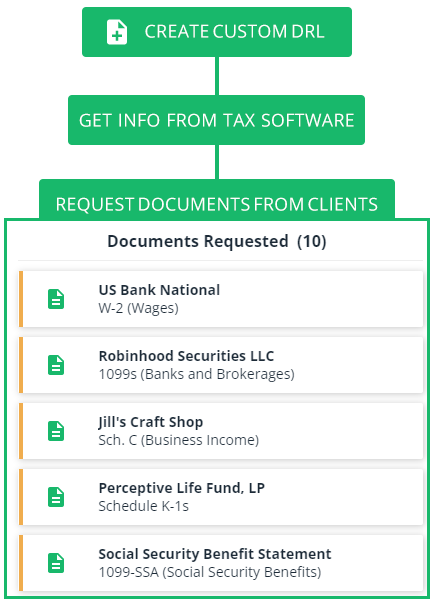
After the custom DRL is created, you can review and edit the DRL and then send the list of document requests to your client.
Covered DRL Categories
In addition to fetching the DRL,
Create Custom DRL
also fetches the client's SSN and mobile phone number from the tax software and populates it into the client's record in Client Management
. If a mobile phone number already exists in TaxCaddy, then it won’t be replaced via Create Custom DRL
.Before you start
Go through the following checklist before you create a custom DRL:
- Roll forward the return to the current tax year in your tax software.
- Your clients' tax software information must be filled out accurately in the CLIENT MANAGEMENT screen.
We recommend providing a client's mobile number in the tax software before creating their custom DRL.
note
Do you have a new client without any proforma information from the prior year? Did you know you can automate the process of getting proforma data for a new client by uploading a client's prior year tax return PDF to SurePrep.
Create a custom DRL
Follow the steps following to create a custom Document Request List (DRL) for online and offline clients:
note
Lacerte tax software requires different instructions.
- To create a custom document request list (DRL), you'll need to first add or import clients.If you are creating a Custom DRL for a new client without any proforma data in your tax software, then you can use Tax Return PDF Extraction to extract data from a previous year's tax return to create proforma for the current year.
- SelectAdministrative, thenClient Management.

- SelectMANAGE CLIENTS.
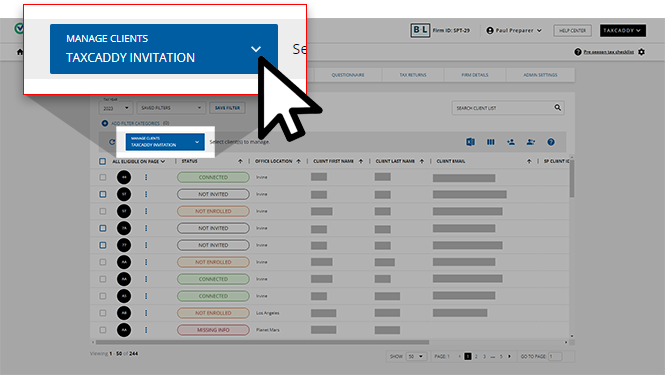
- Under theDOCUMENT REQUEST LISTcategory, selectCreate Custom DRL.
 You will see a message alerting you if your firm has used all of the remaining pre-purchased TaxCaddy Gather or Deliver units.
- The status column shows which clients are eligible for importing proforma data to create a custom DRL.
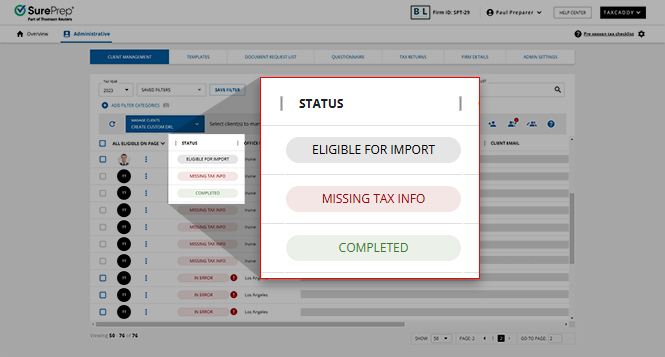 noteBefore creating a DRL, roll over the return to the current tax year in your tax software.You can create a DRL for a client if they have theEligible for importstatus.noteClient record fields pertaining to your tax software will need to be filled out accurately for Custom DRLs to be created successfully.noteIf any required fields on a client record are missing, the status for that client will beMissing Tax Details. To edit the client's record, selectEdit. Once the required fields are filled out, the status will change toEligible for Import.
 - To create multiple clients' DRLs in bulk, you'll need to first select the clients.Option 1:Select the checkbox next to each client to only select those clients.
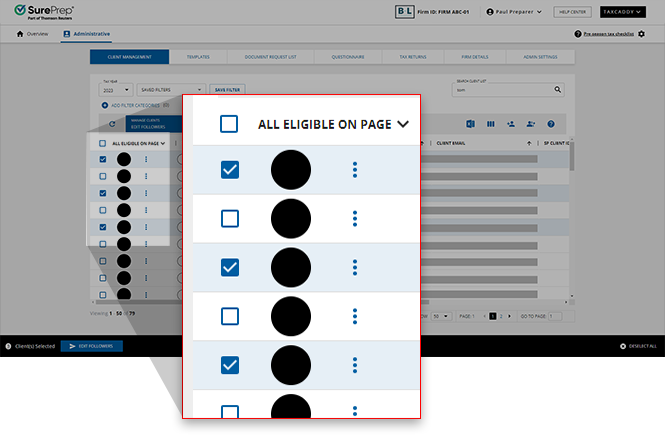 Option 2:To bulk select clients, select the 1st column header then select from the following options:
- All Eligible- Selects all eligible clients in your firm from all pages. However, if you are currently using filters and/or search thenAll Eligible(clients) will only apply to clients who are currently filtered/searched. If you need to perform the same action separately for a different set of clients then you'll need to wait for the 1st bulk operation to complete before initiating the same action for the 2nd set of clients. Requires Manage Bulk Action permission.
- All Eligible on Page- Selects all eligible clients on the current page.
 Only users withManage Bulk Actionspermission can useAll Eligibleto select all eligible clients in the firm. Users without permission will see an error notification when attempting to bulk send to all.
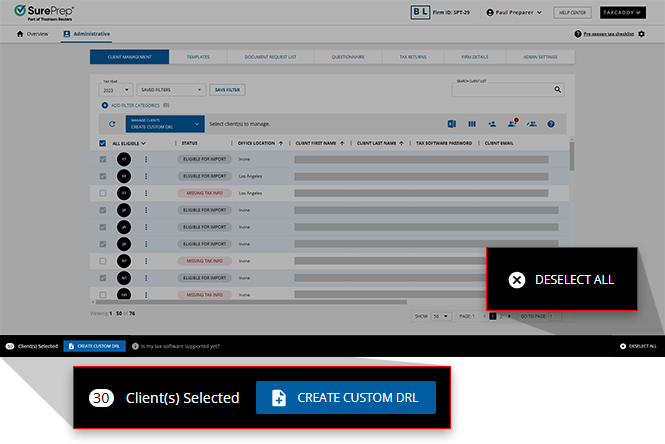
- After you select the clients, a (blue) selection bar slides up from the bottom of the page. SelectCREATE CUSTOM DRLto begin creating a DRL for each of the selected clients.SelectDESELECT ALLto cancel and clear all selected clients.
- A PBFX file will download to your local machine if you only have Lacerte configured as your 1 local tax software. Skip this step if you use GoSystem Tax RS, CCH Axcess Tax, or UltraTax CS.Open the PBFX file. TheTaxCaddy Tax File Uploaderwindow will appear. Keep the window open until all theStatusitems have been completed.
 If the status of a DRL gets stuckIn Queuefor more than 30 minutes, theTaxCaddy Tax File Uploadermay have been shut down prematurely. SelectLaunch DRL
 icon to resume.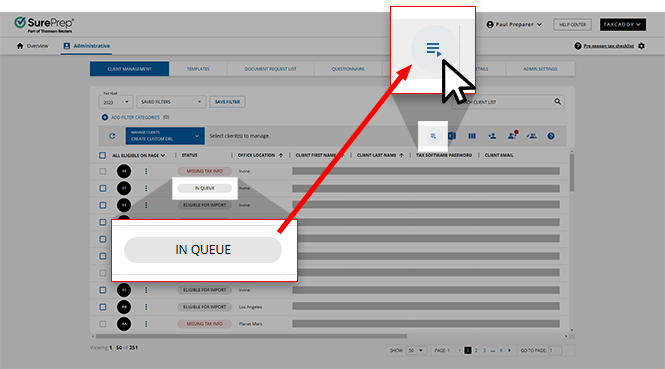
- A notification shows you the current progress for the created DRL. To update the notification with the current status, selectRefresh. If you've started to create DRL queue, the notification will display the current progress for clients processed in the queue.Client's Custom DRL status updates to indicate the current progress.
 The notification will update after all DRL have been created.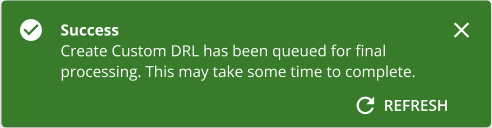
- The client status will update toCompletedif the client proforma data was imported successfully. Next, send DRL to these clients.
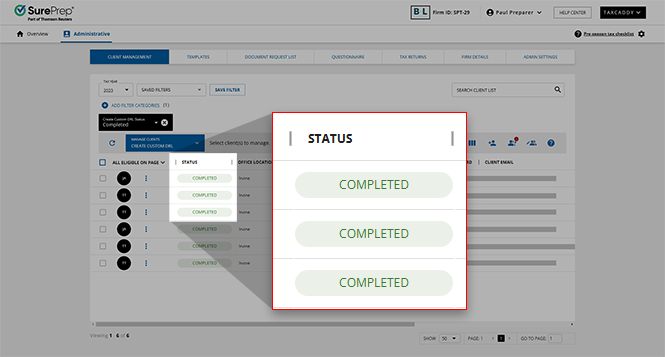 The client status will update toErrorif an attempt to import proforma data failed. Select theError Statusicon for information about why the import failed. Once these issues are addressed, select these clients and create the DRL again.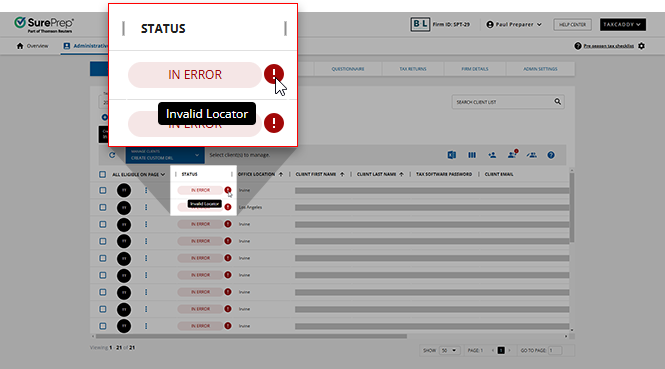
Create custom DRL status
Custom DRL status determines whether you can import proforma data to create a custom DRL for the client.
Create DRL Status | What can I do? | Description |
|---|---|---|
Missing Tax Info | Provide missing tax info to proceed | You can't create a custom DRL for clients with this status because their client record is missing information TaxCaddy needs to locate the client in your tax software. |
In Error | Address issues and then Create DRL | Clients have this status when a previous attempt to import proforma data failed. Mouse over the error status icon for information about why the import failed. Once these issues are addressed, select these clients and create the DRL again. |
Eligible for Import | Create DRL | TaxCaddy is ready to import proforma data.
Tip : You can import proforma data for clients before sending clients an invite to join TaxCaddy. |
In Queue | Wait for the DRL queue to complete | TaxCaddy is in a queue to import client data. |
In Process | Wait for the import process to complete | TaxCaddy is working on importing the data from your tax software. This process can take several minutes. |
DRL Creation In Queue | Wait for the queue to begin creating DRL | DRL import has completed and is now in the queue to begin creating DRL. |
Creating DRL | Wait for the DRL Creation to complete | TaxCaddy is currently in the process of creating DRL for clients. |
Completed | Send DRL | TaxCaddy successfully imported proforma data for clients who have this status. The next step is sending the DRL to these clients. |
What's next?
You can perform the following actions after you have created a custom DRL:
- Send the DRL to one or more clients.
- Edit DRL if you need to make any changes.
- Reset DRL to delete the current DRL.
Related Content
-
Create custom DRL for Lacerte
Format: Article
-
Troubleshoot: Create DRL status
Format:
Article
-
Create custom DRL for Lacerte
Format:
Article
-
Troubleshoot: Create DRL status
Format:
Article
-
Add categories to Document Request List
Format:
Article

