
Troubleshoot: Create DRL status
The
Status
column determines whether you can create and send a DRL to clients.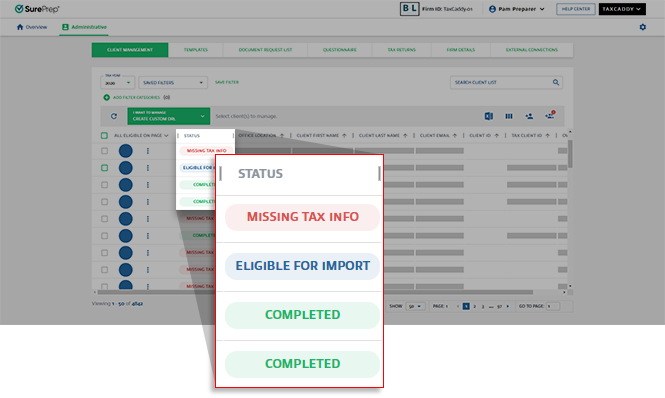
Custom DRL status breakdown
Create DRL Status | What can I do? | Description |
|---|---|---|
Missing Tax Info  | Provide missing tax info to proceed. | You can't create a custom DRL for clients with this status because their client record is missing information TaxCaddy needs to locate the client in your tax application. |
In Error  | Address the issues, then create DRL. | Clients have this status when a previous attempt to import proforma data failed. Mouse over the error status icon for information about why the import failed. Once these issues are addressed, select these clients and create the DRL again. |
Eligible for Import  | Create DRL. | TaxCaddy is ready to import proforma data. tip
You can import proforma data for clients before their TaxCaddy account exists – even before sending the Invite. |
In Queue  | Wait for the DRL queue to complete. | TaxCaddy is in a queue to import client data (in bulk). |
In Process  | Wait for the import process to complete. | TaxCaddy is working on importing the data from your tax application (in bulk). This process can take several minutes. |
DRL Creation In Queue  | Wait for the queue to begin creating DRL. | DRL import has been completed and is now in the queue to begin creating DRL. |
Creating DRL  | Wait for the DRL Creation to complete. | TaxCaddy is currently in the process of creating DRL for clients. |
Completed  | Send DRL. | TaxCaddy successfully imported proforma data for clients who have this status. The next step is sending the DRL to these clients. |
Stuck in queue status (local tax application only)
If you have only 1 local tax application configured in
Account Admin
(Lacerte or UltraTax), then prematurely closing the TaxCaddy Tax File Uploader
window will cause the Custom DRL status
to be stuck with a In Queue
status. To resume the 
TaxCaddy Tax File Uploader
, select the Launch DRL Uploader
button. 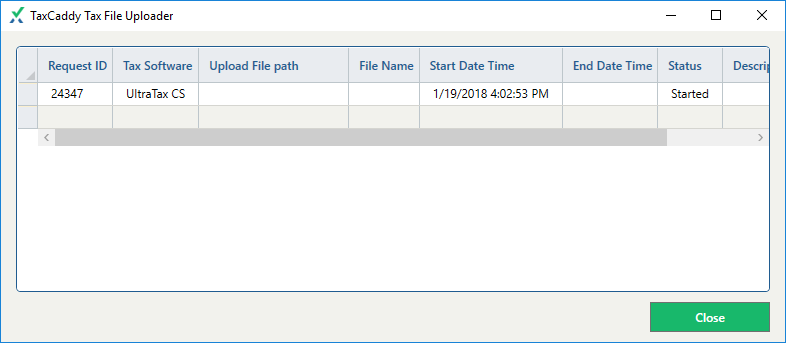
Tax application-specific required fields
Each tax application requires specific client information to create DRL.
- CCH Axcess Tax:
- Tax Client ID: This field is called Client ID in CCH Axcess
- Tax Software Account #: Required*
- Tax Software Password: This is only required if the Tax Client ID requires a password to access the client's tax return from last year.
- Tax Software Version: Required asV1,V2.*
- GoSystem Tax RS:
- Tax Client ID: This is calledLocator Numberin GoSystem Tax RS.
- Tax Software Account #: Required*
- Tax Software Password: This is only required if the Tax Client ID requires a password to access the client's tax return from last year.
- Tax Software Version: Leave blank.
- Lacerte:
- Tax Client ID: This field is called Client Number in Lacerte.
- Tax Software Account #: Leave blank.
- Tax Software Password: Leave blank.
- Tax Software Version: Leave blank.
- UltraTax:
- Tax Client ID: This field is called Client ID in UltraTax.
- Tax Software Account #: Leave blank.
- Tax Software Password: Leave blank.
- Tax Software Version: Leave blank.
When attempting to create DRL, you will see the
Missing Tax Info
status if your client is missing the required information. Edit client record with the missing/incorrect information then try again.Create DRL - In Error status
In Error
status Mouse over the
IN ERROR
status icon for information about why the import failed.Reason: Exceeds the limits code: Unauthorized
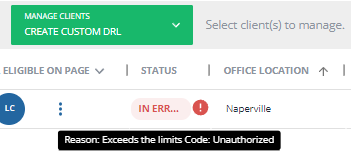
Solution
This message appears for CCH Axcess tax. If you see this message, use the Reset DRLfeature to reset the DRL then use Create DRL again after a few minutes have passed. In some instances, this may require more than 1 attempt.
Related Content
-
Create custom DRL (import proforma data)
Format: Article
-
Create custom DRL (import proforma data)
Format:
Article

