
Delete a tax payment voucher
Follow these steps to delete your client's tax payment voucher.
- On theOverviewscreen, select a client tile to view the client profile. You can also search for a client and select the client tile from the result.

- SelectTax Payments.

- Select theTAX YEARandTAX RETURNwhere the tax payment voucher is located.
 If you are having trouble finding a specific tax payment, you can use the search bar to help you locate it.
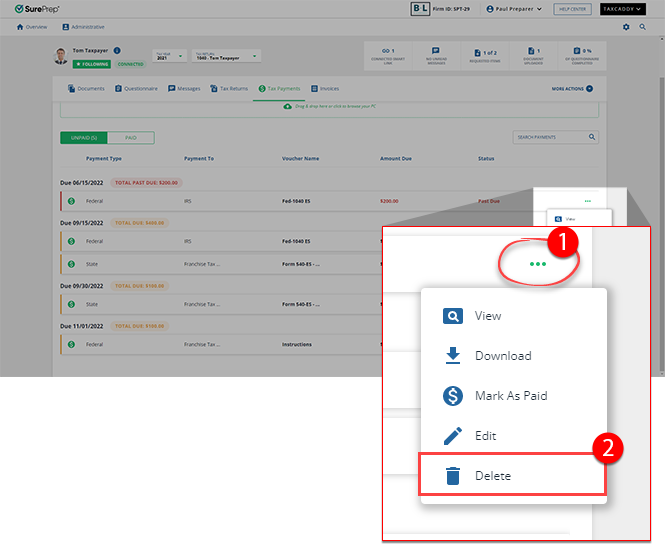
- On the document tile, select theMenu
 icon, then select Delete.
 A tax payment voucher can't be edited or deleted after it has been paid by the taxpayer (via Tax payment processing by mail) or marked as paid by you or the taxpayer. The tax payment status will showPaidorPayment Sent.
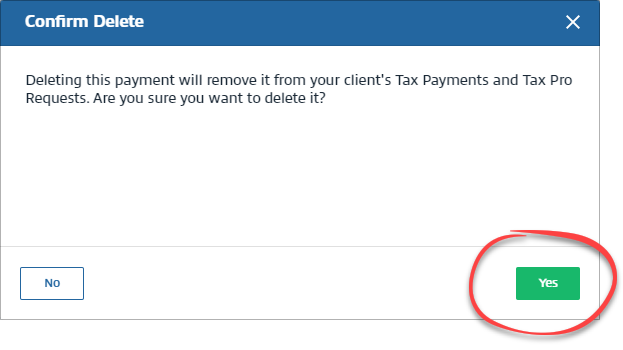
- When theConfirm Deletewindow appears, selectYesto confirm that you want to delete the tax payment voucher. To close theConfirm Deletewindow without deleting the tax payment voucher, selectNo.
Related Content
-
Upload a tax payment
Format: Article

