
Document validation check
TaxCaddy validates your documents upon upload and alerts you if a file you've uploaded to a client's tax return profile is incompatible with the binder creation process. Documents that can't be included in the binder will display an alert icon in the
Uploaded Documents
tab, giving you time to request a re-upload from your client before starting the binder creation process.What is an alert icon?
An  icon is used to notify you of when a file in the
Alert
icon is used to notify you of when a file in the Uploaded Documents
tab can't be included in a binder. 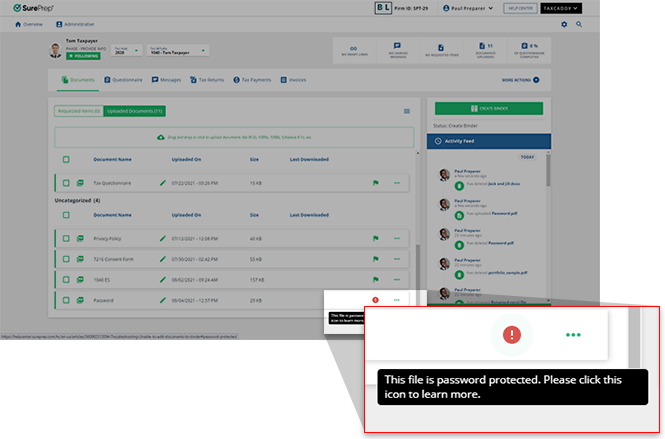
Alert
icons appear with a tooltip that, when pointed to, briefly describes the error with the document and links you to the Help Center for a way to troubleshoot the problem.What causes an alert icon?
An icon appears on a document tile when a document is incompatible with SurePrep's binder creation process.
Alert
icon appears on a document tile when a document is incompatible with SurePrep's binder creation process.Incorrect documents include:
Error | Tooltip text |
|---|---|
PDF Portfolio | The file is an unsupported PDF Portfolio. Please click this icon to learn more. |
Damaged file | This file is damaged or corrupted. Please click this icon to learn more. |
Password-protected file | This file is password protected. Please click this icon to learn more. |
Digitally encrypted file | This file is digitally encrypted. Please click this icon to learn more. |
Password-protected sheet | This file is password protected. Please click this icon to learn more. |
Related Content
-
Upload files to client's Uploaded Documents
Format: Article
-
Upload files to client's Uploaded Documents
Format:
Article
-
Document Viewer (PDF Viewer)
Format:
Article
-
Rename documents
Format:
Article
-
Switch between tax documents
Format:
Article

