
Rename documents
You can edit the names of documents in a client's
Uploaded Documents
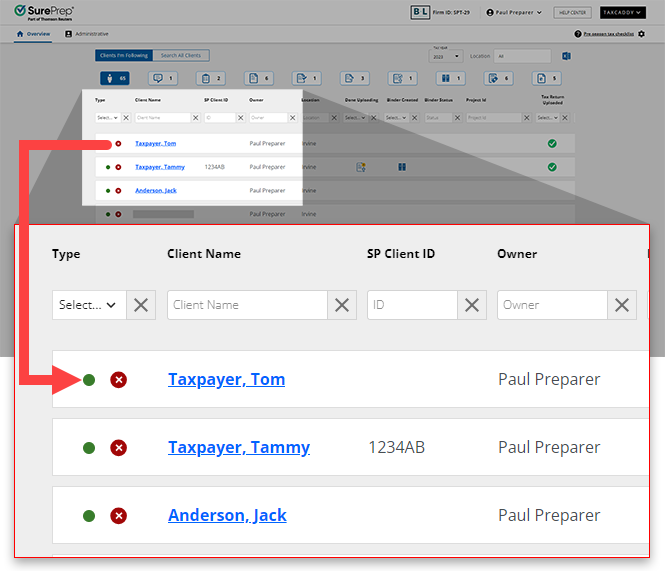
. Follow these steps to edit the name of a document.- On theOverviewscreen, select a client's tile to view the client profile. You can also search for a client then select the client tile from the search result.
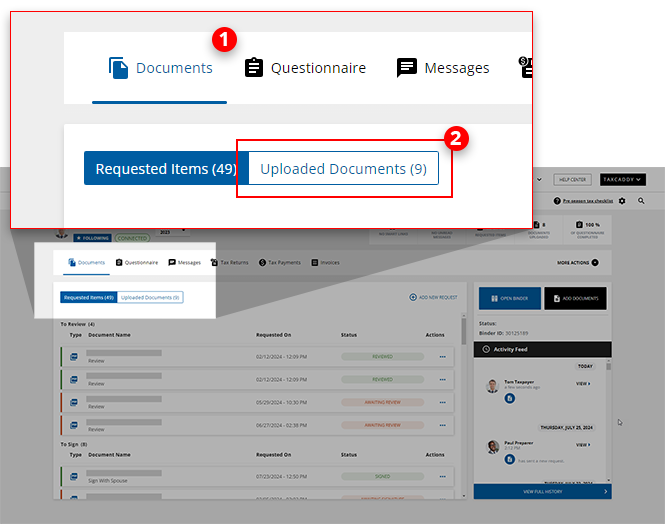
- SelectDocuments, then selectUploaded Documents.
- Select theMenu
 icon of the document you'd like to update, then select Edit document name.
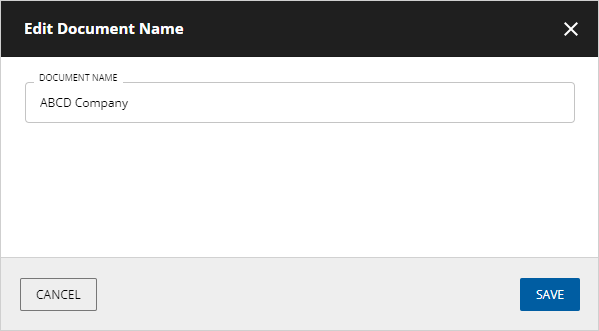
- When theEdit Document Namewindow appears, enter a new name for the document, then selectSAVE. The document will be updated with the new name.
Related Content
-
Document Viewer (PDF Viewer)
Format: Article
-
Text annotations
Format:
Article
-
Shapes annotations
Format:
Article
-
Change annotation style
Format:
Article
-
Delete annotations
Format:
Article
-
Shapes annotations
Format:
Article
-
Change annotation style
Format:
Article
-
Delete annotations
Format:
Article
-
Change annotation style
Format:
Article
-
Delete annotations
Format:
Article
-
Delete annotations
Format:
Article
-
Mark documents as Viewed and Unviewed
Format:
Article
-
Manage Done Uploading status for the client
Format:
Article
-
Document validation check
Format:
Article
-
Document flags
Format:
Article
-
Delete documents
Format:
Article
-
Move documents to another category or tax year
Format:
Article
-
Download multiple documents at once
Format:
Article

