
Understand URL scanning on emails
When you receive an email that contains a URL, Proofpoint automatically scans the link to ensure your safety. This is enabled for all Virtual Office CS (VO) Hosted Exchange users. Here's how it works:
URL scanning and protection
Every URL in your email is scanned by Proofpoint's Targeted Attack Prevention system. This includes a special feature called URL Rewrite, which helps protect you by preventing access to potentially harmful websites. When you hover over a URL in your email, you'll notice it has a
urldefense.com
wrapper.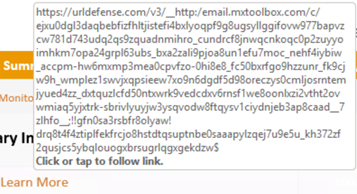
- If the URL is deemed safe, you'll be redirected to the original website without any issues.
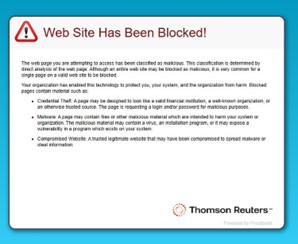
- If the URL is considered malicious, access to it will be blocked, and you will see a Proofpoint message:Web site has been blocked!If you believe the URL should not be blocked, contact Support at +1 800-968-0600.
Warning tag on emails with a newly registered domain or suspicious characters
If a URL is from a newly registered domain, the following warning will appear at the top of the email:
Caution: This email is from a suspicious or newly registered domain. Verify the sender before clicking links, sharing sensitive information, or opening attachments.
If the email content has suspicious or mixed characters, the following warning will appear at the top of the email:
Be Careful With This Message: This message may contain links to a fake website.
If you believe the email is suspicious, select
Report Suspicious
.
