
Apply tax law updates
To apply a tax law update, complete the following steps:
- In theCalendar Setupmodule, selectTax Law Update, thenEvent Templates. This opens thePending Event Templatesscreen.
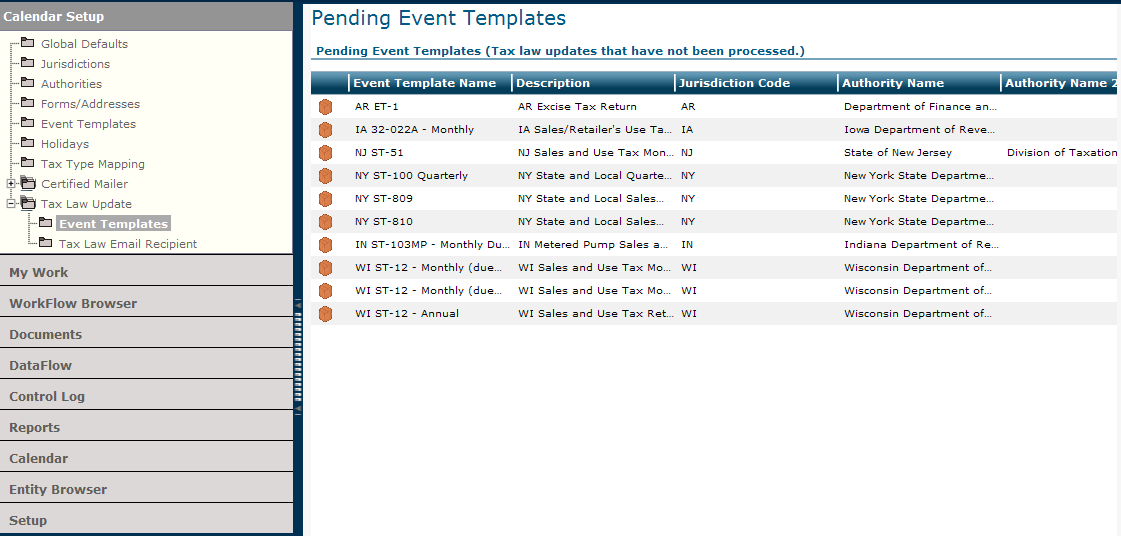
- Select an event template name.
- SelectApply Tax Law Updatefrom theActionsmenu.A message reminds you that this process will update event templates with current law. The system places theNo Roll Forwardicon on the impacted scheduled events, which you can view on the Calendar grid for the current and/or future years.
- SelectOKto continue.The system removes the selected template name from the Pending Event Templates grid.
Related Content
-
2020 files
Format: Article,
1 min read
Article,
1 min read
-
2021 files
Format:
Article,
1 min read
-
2022 files
Format:
Article,
1 min read
-
2023 files
Format:
Article,
1 min read
-
2024 files
Format:
Article,
1 min read
-
September 2024 release information
Format:
Article,
4 min read
-
October 2024 release information
Format:
Article,
5 min read
-
November 2024 release information
Format:
Article,
4 min read
-
December 2024 release information
Format:
Article,
4 min read
-
January 2025 release information
Format:
Article,
5 min read
-
Late January 2025 release information
Format:
Article,
6 min read