
Custom User Provisioning for Self-service Q&A powered by CoCounsel in HighQ
The Self-service Q&A powered by CoCounsel feature in HighQ enables law firms to offer AI-powered self-service support through a chat interface. Since CoCounsel doesn’t natively support external users, a custom user provisioning model has been created to provide access to external users.
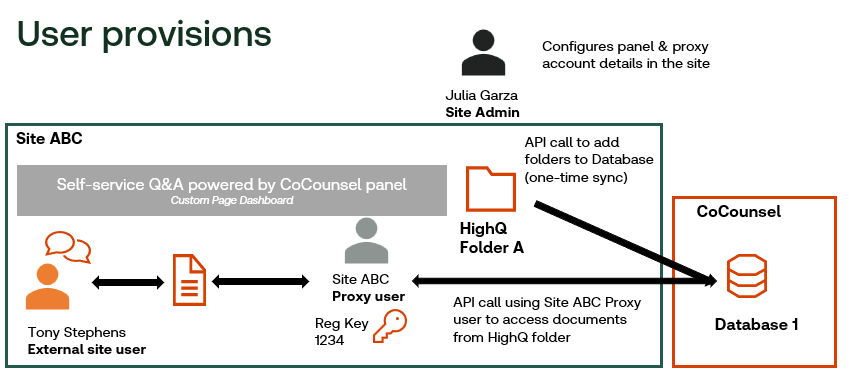
This document outlines the three different users and explains how each interacts with the system to ensure secure and efficient access:
- Site Admin;
- Proxy External User; and
- Site User.
Site Admin
The Site Admin plays a critical role in managing and configuring the Self-service Q&A powered by CoCounsel integration within HighQ. They are responsible for setting up the dashboard panel and configuring the CoCounsel database.
Additionally, Site Admins share the CoCounsel database with proxy external users, ensuring that the system is accessible for searching and interaction.
note
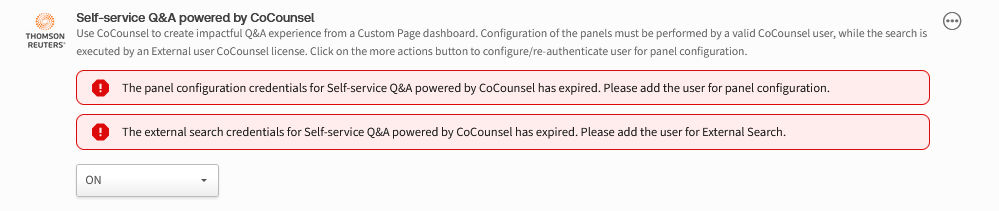
Site administrators must renew their credentials every 7 days if they have used CoCounsel within HighQ during that period, and revalidation is only required when they need to make edits to the Q&A panel.
Proxy External User for Search
The Proxy External User acts as the operational intermediary between the Site User and the CoCounsel system. This user executes API calls to the "
Search a Database
" skill in CoCounsel on behalf of the Site User.Proxy users do require a new Self-service Q&A CoCounsel license which will be generated during the purchase of this add-on. Contact your account representative if you’ve not received this yet.
note
The Self-service Q&A CoCounsel license credentials used by proxy users expire every 45 days. However, if users log in with their credentials daily, their authentication token remains active and does not require revalidation. Revalidation is only necessary if the token remains unused for a continuous 45-day period.
Site User
The Site User engages directly with the Self-service Q&A system, asking questions and receiving answers from the database. They do not require a CoCounsel license. The Proxy External User is tasked with executing searches within CoCounsel on behalf of Site users. Site users can be either internal or external, providing flexibility in how searches are conducted and ensuring that they receive the information they need.
Any user who has access to the dashboard will be able to interact with the documents in the connected database through the Q&A panel. If there are users who should not have access to this data, permissions must be applied at the dashboard level to restrict their access.
The below table provides an overview of roles and requirements for custom user provisions related to Self-service Q&A in HighQ:
User role | Access type | Access level |
|---|---|---|
Site Admin | Full Admin |
|
Proxy External User | Search Agent |
|
Site User | End User |
|
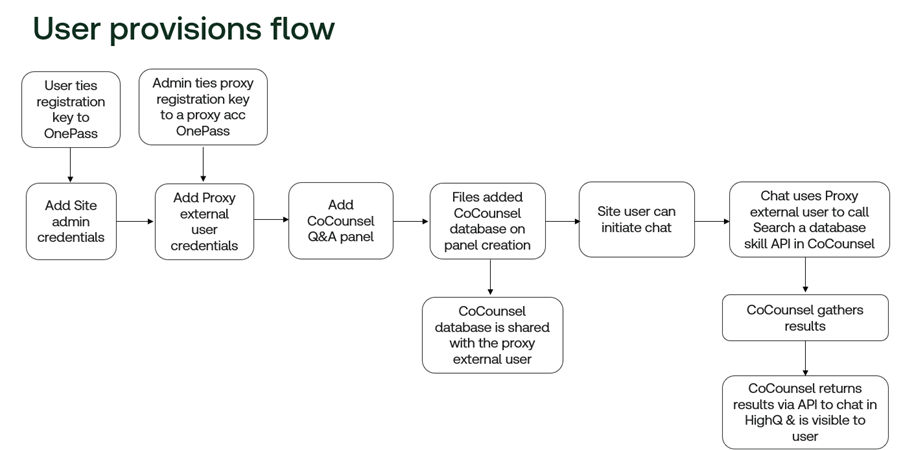
The following graphic/flow diagram explains how each user interacts with the CoCounsel database:
Related Content
-
Self-service Q&A powered by CoCounsel in HighQ
Format: Article
-
CoCounsel Reports
Format:
Article,
4 min read
-
CoCounsel integration - Introduction and Overview
Format:
Article