
What's new in Contract Express Author 9?
More frequent enhancements
Version 9 of Contract Express Author will be updated on a more regular basis, with enhancements and new features released each month as we focus on making the authoring experience more intuitive.
This page provides an overview of the key enhancements released each month and links to the related help articles.
November 2022 (Release 9.0)
Refreshed Contract Express ribbon and Editor toolbars
The Contract Express ribbon and the Markup Editor and Dictionary Editor toolbars have been refreshed with new layouts and updated icons and labels to provide a more intuitive authoring experience.

More weight has been given to the most frequented buttons to improve efficiency.
For example, the
Go to definition
button in the Dictionary Editor toolbar has been replicated on the Contract Express ribbon for easy access. To make this action even more efficient, we have removed the need to highlight the full variable name in the document; you can simply place the cursor anywhere in the variable and click the button to jump to the definition in the dictionary.Markup Editor navigation
Markup Editor now refreshes automatically to display the expression that your Word cursor is on without you needing to manually refresh the panel, for a more seamless editing experience.
An expression counter is now displayed alongside the navigation arrows to provide you with a better understanding of the markup contents of the template.
To ensure that unapplied edits made to an expression are not lost, you will be prompted to action your changes in the Markup Editor when navigating to a different expression in the document.

See Using the Markup Editor for more information.
Dictionary Editor questionnaire view
In the questionnaire view of the dictionary, the pages and groups now expand automatically when using drag and drop to allocate a variable, so that variables can be dropped into the correct position with ease.
See Organising the questionnaire into groups and pages for more information.
Usage Check
Usage Check (previously called "Usage Analysis") now displays a counter for serious and non-serious errors, making it easier to see at a glance the amount of troubleshooting required for the template.

Usage Check can also be run by clicking the refresh button in the Dictionary Editor and Markup Editor panels, enabling you to remain focused on editing and troubleshooting.
See Usage Check for more information.
Questionnaire warnings
To improve the questionnaire experience in scenarios where a complex expression is used as a warning condition, resulting in a long list of links to triggering questions, a new setting has been introduced to enable the links to be hidden.
See Adding warnings to the questionnaire for more information.
Variable attributes
A new attribute
Exclude from Questionnaire Completeness
can be used to exclude optional questions from the questionnaire completeness calculation.See Editing variables for more information.
Substring function in Select statements
The logic of the Select operators has been extended to allow selection of values that contain a specified substring. The Substring function can now be used in the “where” part of Select statements to filter data coming from internal or external lookup tables.
See Select Operator (from Lookup Table) and Select Operator (from External Data Source) for more information.
Updated help article
The eSignature field article has been updated to provide an example of how to use a computable to automatically select a DocuSign template that corresponds to the number of recipients, when repeat expressions are used in the Contract Express template to collect recipient details.
December 2022 (Release 9.1)
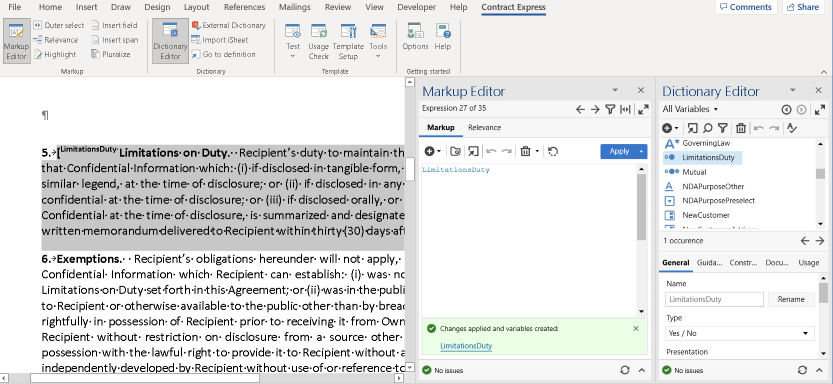
Review, edit, insert and delete markup in one place using the Markup Editor
You can now insert fields and spans into your template from the Markup Editor, easily reusing existing variables and business rules or creating new ones.
When you apply an expression that contains a new variable name, a new variable will be automatically created in the Dictionary and the Markup Editor will display a link so you can navigate directly to it in the Dictionary Editor to edit the definition and other details as needed.
For more information, see Using the Markup Editor.
January 2023 (Release 9.2)
Markup Editor - automatic navigation
In release 9.0, we introduced "automatic navigation" which automatically updates the pane to display the expression that your Word cursor is on without you needing to refresh it manually.
With release 9.2, automatic navigation will pause when you start to edit an expression to ensure you don’t lose your changes. Once your changes have been applied to the template or discarded, automatic navigation will resume seamlessly.
See Using the Markup Editor for more information.
February 2023 (Release 9.3)
New locales
Two new locales have been added to Contract Express: Italian and Brazilian Portuguese.
For the full list of supported locales and how to apply them to an expression, see Span locale.
Updated help article
Testing the questionnaire article has been updated to explain how to preserve tracked changes when uploading a template to Contract Express.
March 2023 (Release 9.4)
Fewer clicks to reuse fields and spans
In release 9.1 we added the ability to reuse expressions when editing a new field or span using the Markup Editor.
To make this even easier, now you can insert an existing field or span rule with fewer clicks than before.
For more information, see Using the Markup Editor.
April 2023 (Release 9.5)
Updated Usage Check
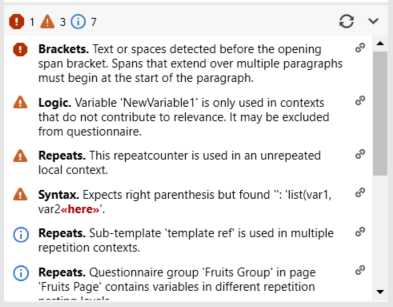
The Usage Check list has been redesigned for a clearer and more intuitive way to identify and troubleshoot issues in your template. The issues now appear in order of severity, with the most serious issues at the top for easier troubleshooting.
Each issue is prefaced by a sub-category in bold text so you can quickly identify and contextualize as you scan through the list. You can single-click into the issues to navigate to the position of the error in the template to troubleshoot.
See Usage Check and Troubleshooting for more information.
External Dictionary attach type saved
The External Dictionaries list now displays an Attach Type column to indicate whether an external dictionary was attached with or without questionnaire pages and groups.
This has been added in preparation for an enhancement coming in May that will allow you to refresh the questionnaire pages and groups from external dictionaries.
See Using an external dictionary across multiple templates for more information.
Updated help article
Special characters in variable names, template names, lookup column names, and text strings has been updated with examples of how to use a backslash to escape special characters when quotation marks are used in a text string inside an expression.
May 2023 (Release 9.6)
Test the questionnaire in Word
Quickly review changes that you make to a template with our new Test in Word feature.
You can now launch test questionnaires in Word, reusing your previous test answers to save even more time.

For more information, see Testing the questionnaire.
Troubleshooting tips in the Markup Editor
To help you resolve issues faster, the Issues section in the Markup Editor will now show any Usage Check errors related to the current expression as well as additional troubleshooting information.
See Using the Markup Editor for more information.
External Dictionary refresh includes questionnaire pages and groups
Building on our April release, where we added an Attach Type column to the external dictionaries list, questionnaire pages and groups can now be updated when performing a refresh.
See Using an external dictionary across multiple templates for more information.
June 2023 (Release 9.7)
New function
Calculate the number of working days between two dates using the new WorkdaysBetween Function.
Resolve template errors faster
In the Usage Check, clicking on errors related to Dictionary Editor items will navigate you to the relevant view in the Dictionary Editor so you can review and fix the issues quicker.
For more information on resolving template errors, see Troubleshooting and Usage Check.
Updates to UK Companies House search
The UK Companies House search can now retrieve more information about UK Entities, Overseas Companies and Limited Partnerships.
For the full list of fields available for import, see Enabling company search in the template.
July 2023 (Release 9.8)
Insert formatted text mid paragraph
The "Include HTML" field can now be used to insert formatted text from questionnaire answers in the middle of a sentence or paragraph.
This provides greater flexibility with the use of rich text variables, except where technical limitations require text formatted as a table or list to be inserted as a whole paragraph.
For more information, see Include HTML field.
Rename and replace locally defined variables
You can now use the rename feature to quickly replace locally defined variables with variables from an external dictionary, and update all occurrences in your template.
For more information, see Renaming variables.
Clearer template setup options
The template setup window now includes clear descriptions of the purpose for each field.
For more information, see Template setup.
Easier template reporting
Select and switch between report types with ease to get a useful overview of your template components.
For more information, see Creating a Dictionary Report document.
August 2023 (Release 9.9)
Easy navigation to resolve issues faster
Clicking into an issue in the Usage Check list now takes you directly to the relevant field position in the dictionary or document.
For more information, see Usage Check.
Use rich text variables in-line with confidence
When a rich text variable is placed in-line in the template, end users will no longer see the option to add lists and tables in the formatting toolbar for the corresponding input field on the questionnaire. This will reduce the risk of document generation errors caused by unsupported formatting.
note
Your web application must be running Contract Express 9.9 or higher to benefit from this enhancement.
September 2023 (Release 9.10)
Easy review of External Table data
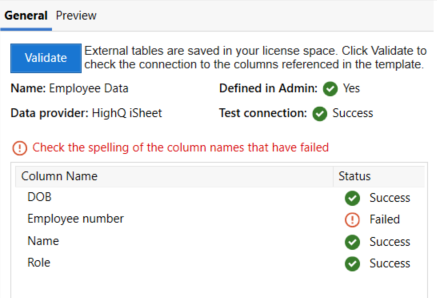
A new External Tables section has been added to the Tables view in the Dictionary Editor.
It lists all External Tables that have been referenced in the template and can be used to quickly validate that data can be accessed successfully. You can also get a preview of sample data to help determine if any formatting rules need to be applied.
Troubleshoot your select statement markup and external data access efficiently.
For more information, see Accessing external data in the questionnaire.
Side by side layout for questionnaire groups
A new "side by side" layout enables easy data entry with the questions and input fields aligned to each other.

For more information, see Organising the questionnaire into groups and pages.
New functions for working with lists
- ListSkip Function: Returns a list with the specified number of elements removed from the start of the list.
- ListTake Function: Returns a list with only the specified number of elements from the beginning of the input list.
- ToList Function: Updated to enable the separator to be specified, which is used to identify individual strings in the input text.
Clearer Issues tab in Options
Display of Issues tab in Options has been optimized to help with navigation and clarity.
For more information, see User options.
November 2023 (Release 9.11)
Automatic update of External Dictionaries
External dictionaries are refreshed automatically for all templates open in Word, when a new version of external dictionary template is uploaded from Word.
For more information, see Using an external dictionary across multiple templates.
New functions for working with lists
- Enumerate Function: Returns a list of all combinations of elements from multiple lists.
- PairUp Function: Returns a list of pairs of adjacent elements from a source list.
December 2023 (Release 9.12)
Server URL validation in Options window
When a new Server URL is added in the Options window, it will be immediately validated to prevent errors that might disrupt the automation process down the line.
Updated help article
The Collect Function article has been updated to clarify the requirement of referencing a question variable to achieve the functionality described.
March 2024 (Release 9.15)
AI-powered Chat tool for natural language help (Beta release)
Access help information quickly and easily with the new
AI-powered Chat
in Author.- Ask natural language questions about template authoring.
- Get help and suggestions from multiple sources.
- Easily access the articles relevant to the topic from the Author Help manual and Knowledge Base with one click.
April 2024 (Release 9.16)
Updated help article
The Round Function article has been updated to clarify the rounding behaviour when the number is even or odd.
July 2024 (Release 9.19)
Global company search using Orbis service
Look up global company data by leveraging Orbis, a third-party tool that allows users to find company data and populate questionnaire and document fields quickly and accurately. This feature requires an Orbis subscription. To find out more about this functionality, click here.
Improved accuracy of relevance of variables
The Usage tab now flags when a refresh is required to ensure the information about the relevance of variable is up to date and remains accurate. Authors can easily check on this tab if the question will be relevant for the document generation.
Updated help article
The AI Chat FAQ article has been updated with more information about the Azure OpenAI service routing approach which allows us to enable AI Chat functionality in Contract Express instances hosted in the Germany region.
Related Content
-
What's new?
Format: Article