
How do I reprocess output interface history (LOG) in In Out?
The function of this history is to facilitate the
reprocessing
of the output interfaces. When a reprocessing request occurs, the database routines responsible for executing this request are triggered according to the parameters (keys) reported in the interface registry.Reprocessing output interface history
- Access the menuInterfaces > Output Interfaces History (LOG).
- On theOutput Interface Historyscreen, fill in the filter fields with the interface data you want to reprocess and/or clickFilter.To further narrow the search results, clickAdvanced Filters
 .
. - In the table, check the record to be reprocessed and clickReprocess
 .To reprocess more than one interface record at the same time, select the desired records and click theReprocess All
 button located in the table header.Table data can be organized using theHide Filtersbuttons
 , Show Grouper,
 and Show/Hide Columns buttons
 .
.
Exporting output interface History
- Access the menuInterfaces > Output Interfaces History (LOG).
- On theOutput Interface Historyscreen, select the history lines you want to export.To export data from all rows in the table, this marking is not required.Table data can be organized using theHide Filters, Show Grouper, and Show/Hide Columnsbuttons.
- ClickExport
 .
.
An Excel file will be generated with the interface information.
Checking output interface (LOG) history for error correction suggestions
This feature provides AI-generated suggestions for resolving errors when reprocessing output interfaces using the Thomson Reuters AI tool.
attention
To use this feature, make sure that the
Open Arena Integration
parameter is set to Y (Yes) on the General Parameters
screen. If you need to update this parameter, contact an administrator user for assistance.- Go to menuInterfaces > Output Interfaces History (LOG)
- On theOutput Interface Historyscreen, locate the error you want to correct
- SelectAI Error Insights
 .
.
This action opens the
AI Error Insights
pop-up where you can see suggestions on how to resolve errors when reprocessing output interfaces.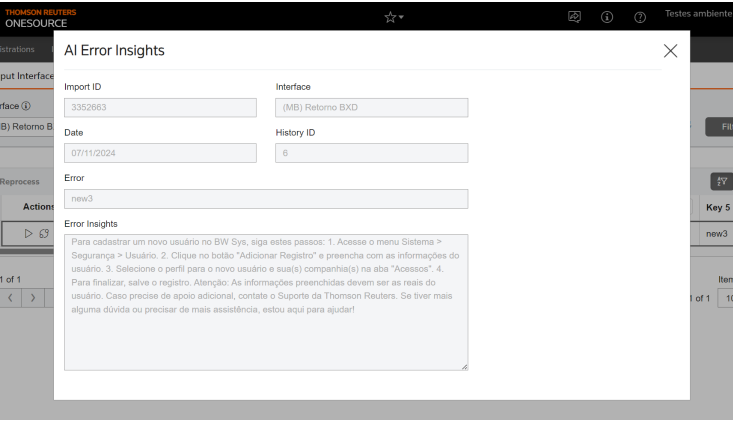
Related Content
-
How do I manage In Out input interface tables?
Format: Article
-
How to configure and manage FTP/SFTP tasks in In Out?
Format:
Article
-
How to manage external files in In Out?
Format:
Article
-
How to manage macro replacements in In Out?
Format:
Article
-
How do I upload an SFTP file to In Out?
Format:
Article