
Fix Functionality
When Customs sends a functional error in a CUSREC (Customs Receipt) incoming message, a
Fix
action appears. This message indicates that there are one or more errors in the declaration data that needs to be resolved before the declaration can be accepted by Customs.Functional errors may occur at three different levels of the declaration, each of which is explained in the sections below:
- Supplementary Declaration Header
- Simplified Declaration Header
- Simplified Declaration Goods Item
Error at Supplementary Declaration Header Level
If Customs rejects the full Supplementary Declaration, an error will occur at the Supplementary Declaration header level. Should this occur, the whole declaration must be revised and resubmitted to Customs.
The declaration will return to an editable state (Draft) so any required modifications can be made. Make any necessary changes and re-submit the Supplementary Declaration.
Error at Simplified Declaration Header Level
If Customs accepts the Supplementary Declaration header but does not accept any of the associated goods items or Simplified Declarations, an error will occur at the Simplified Declaration header level.
Should this occur, Customs will transmit an
ATA
… Customs Reference Number. This number indicates that the Supplementary Declaration header was accepted, but no goods items were accepted by Customs.If multiple Simplified Declarations were attached to the Supplementary Declaration and at least one goods item was accepted by Customs, Customs will transmit an
ATF
… Customs Reference Number.Error at Goods Item Level
Receiving an error at the goods item level works the same as above in section Error at Simplified Declaration Header Level Fix Functionality
However, if at least one goods item was accepted by Customs, then the Supplementary Declaration will receive an
ATF
… Customs Reference Number and an Accepted
State value. Resolving an Error
All errors must be resolved by using the
Fix
functionality. To send a Fix message, click
Fix
.
Clicking
Fix
will create a new sequence on the ATLAS Supplementary Import Declaration
screen. When the expansion arrow on the far left is clicked, you will see the Fix
screen.To view the list of errors per declaration, click on the
Declarations Error
tab.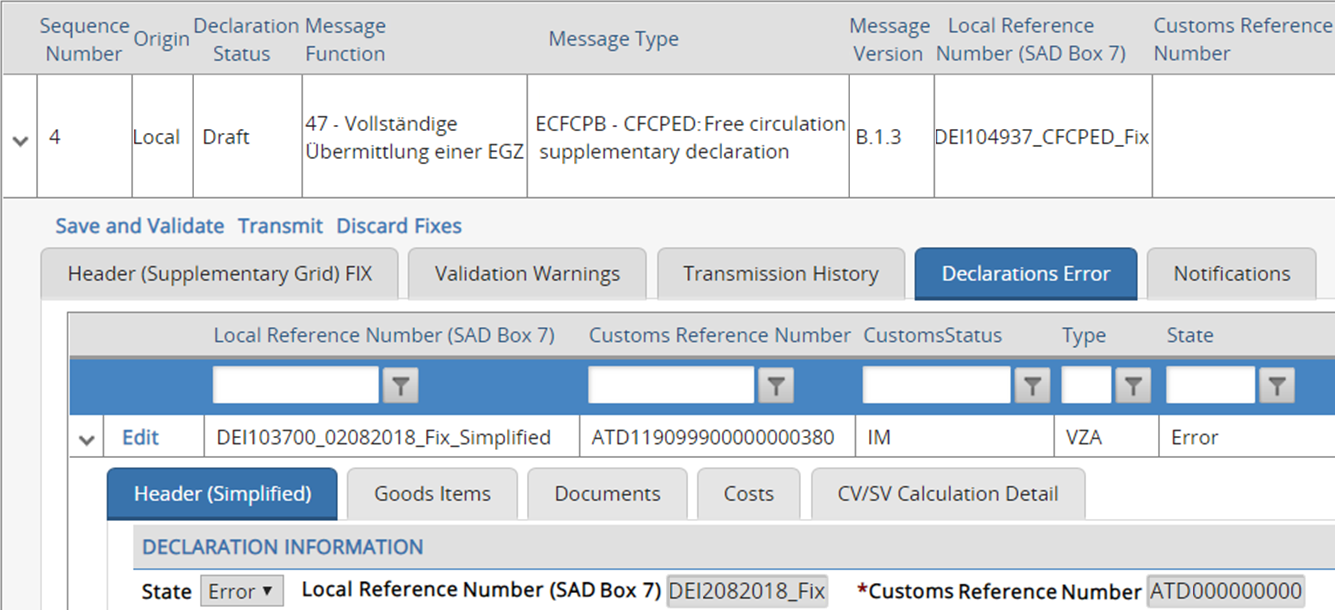
The
Fix
screen will only display declarations and goods items containing errors. The incoming Customs Receipt (CUSREC) message provides further information regarding the source of the error and how to resolve the issue. Make any necessary changes.
Once all necessary changes have been made to the discrepant declarations and goods items, click
Save and Validate
. The system will then perform a validation process to confirm that the entered data adheres to Customs rules and regulations.If the data contains errors and one or more fields do not adhere to Customs rules, a warning will appear in the
Validation Warnings
tab for each error. The Transmit
button will be disabled until these errors are resolved.Review the warnings to determine where the error exists. Navigate to the discrepant field(s) and resolve the error(s). Once all errors have been resolved, click
Save and Validate
again.If all errors have been resolved, the
Transmit
button will become available.To transmit the Supplementary Declaration to Customs, click
Transmit
. Once
Transmit
is clicked, a notification message appears at the top of the screen to notify you whether or not the message was successfully transmitted.To view the outgoing XML message, click
View file
.If successful, the declaration status will change from
DRAFT
to TRANSMITTED
. Incoming messages from Customs will be received for the declaration.If the
Fix
message is Accepted by Customs, the screen will redirect from the Fix screen to the generic screen with its previous Message Function
value.If the
Fix
message still has functional errors, then an error still exists. Should this occur, click the Fix
button again and repeat the process.Related Content
-
DE Atlas Import
Format: Article