
FTZ Management: Reports - CF7501 Weekly Entry, AD/CVD Certification, Steel Melt and Pour, Copper Smelt and Cast, and Additional Tariffs
The
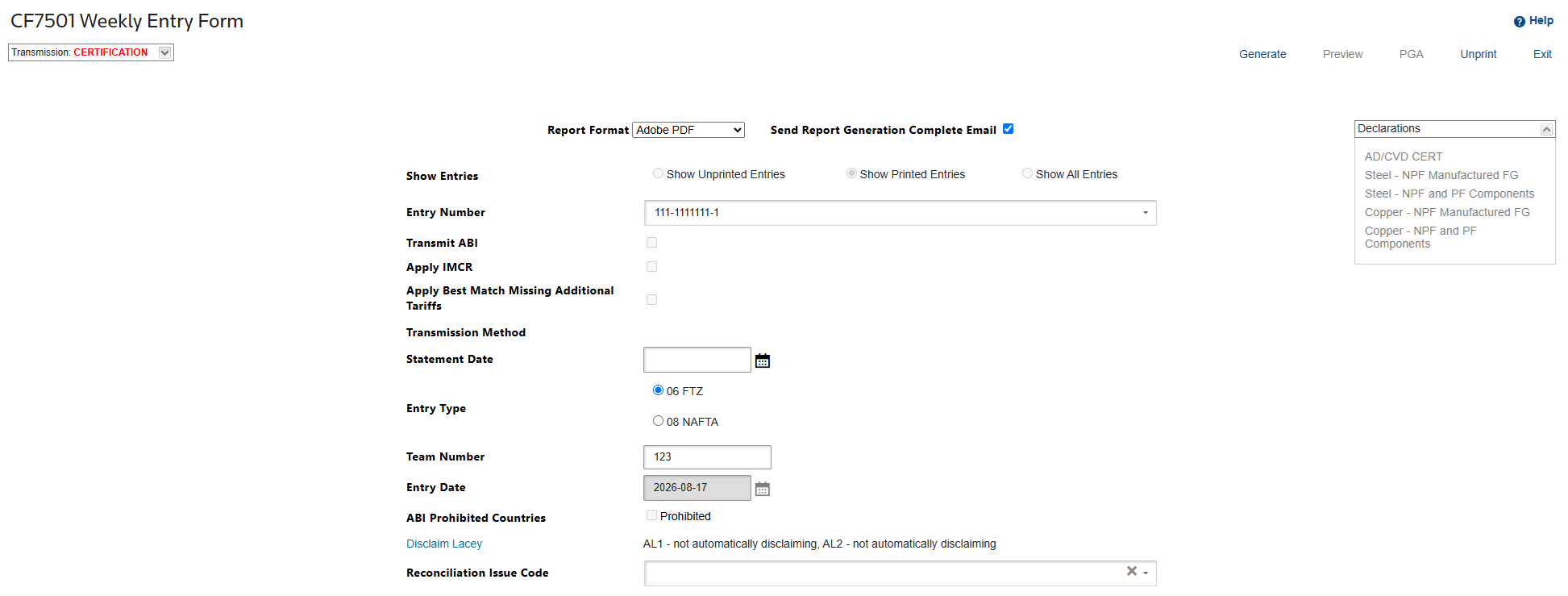
CF7501 Weekly Entry Form
screen is used to create the following documentation:- Finished Good HTS Summary
- CF7501 Weekly Entry Summary
- CF7501 Continuation Report
- Component HTS Summary
- ABI Entry File
To retrieve a report:
- Select eitherShow Unprinted EntriesorShow All Entries.
- If transmitting a file electronically to an ABI provider, check theTransmit ABIbox.
To create a report:
- ClickGenerate. A report can be generated as an Adobe PDF (default), Excel spreadsheet, or Word document. These options are available in theReport Formatdrop-down.
- To view a generated report, click the associated link.
important
It is not possible to undo or stop a 7501 generation. Once it starts, it must complete the process.
To use Item Master Custom Rules (IMCR) on your 7501 Entry Summary
If the
Apply IMCR
box is checked and the 7501 is in Unprinted status, the generate functionality will utilize existing IMCR rules to apply any missing additional tariffs where there is a match to the current shipments on 7501 Entry Summary.If you would like the opportunity to review any potentially missing additional tariffs before generating the entry, you can click the
Review Missing Additional Tariffs
link. This link will direct you to the FTZ Unprinted Shipments Missing Additional Tariffs Lookup
. This lookup will run validations against your Unprinted 7501 to identify any potentially missing additional tariffs from the entry. You can then add any new IMCR rules you would like, and we will apply these new rules during your next 7501 generation if you check the Apply IMCR
on your 7501 entry. For more details on adding IMCR rules when a Chapter 99 already exists and another needs to be added, check the Using Review Missing Additional Tariffs and Adding in Item Master Custom Rules to update 7501 Entry Lines
section in this article.The
FTZ Unprinted Shipments Missing Additional Tariffs
Lookup only validates unprinted 7501’s, so if you have already generated your entry and you want to utilize the lookup, please Unprint your 7501 first.important
For more help with IMCR functions, refer to the following videos:
To add additional Data to send when self-filing or to and ABI provider, please see these links:
Send Report Generation Complete Email: Checking this option sends an e-mail so other tasks can be performed as the CF7501 generates. To proceed without a confirmation e-mail, uncheck the box.
Entry Type:
- 06 - The only standard FTZ entry type we support at this time.
- 08 – Currently not supported. When this entry type was first introduced to ACE, we offered to test with CBP but it was not available for testing purposes. There is also work within the NAFTZ to have manufactured exports to Canada or Mexico included for bonded movements which would eliminate the need for this entry type. We have halted further development until there is more guidance on this zone entry type.
Disclaim Lacey: For information on how to add a Mass Disclaim for APHIS Lacey information that was filed through LAWGS, please see this link:
Reconciliation Issue Code: If you wish to flag your entry for Reconciliation in ACE and if you are a self-filer or set-up to transfer a Reconciliation code to your broker, select the Reconciliation code you want to transmit on the entry summary.
AD/CVD Certification Designation
An Importer’s Additional Declaration Type Code 06 (AD/CVD Certification Designation) has been added to the Entry Summary. This is required when you want to designate whether the Entry Summary line is accompanied by an AD/CVD-related importer/exporter certification(s) as prescribed by the Department of Commerce (DOC), Enforcement and Compliance.
An AD/CVD Certification Designation is an indication that an AD/CVD certification document or documents are in possession of the importer and that the documents have been uploaded timely to DIS for CBP and DOC scrutiny.
If you wish to add an AD/CVD certification designation to a product on a CF7501 entry summary, additional data elements will be required for filing to Customs. This screen can be accessed from the "
Declarations
” dropdown box and the “AD/CVD CERT
” link. 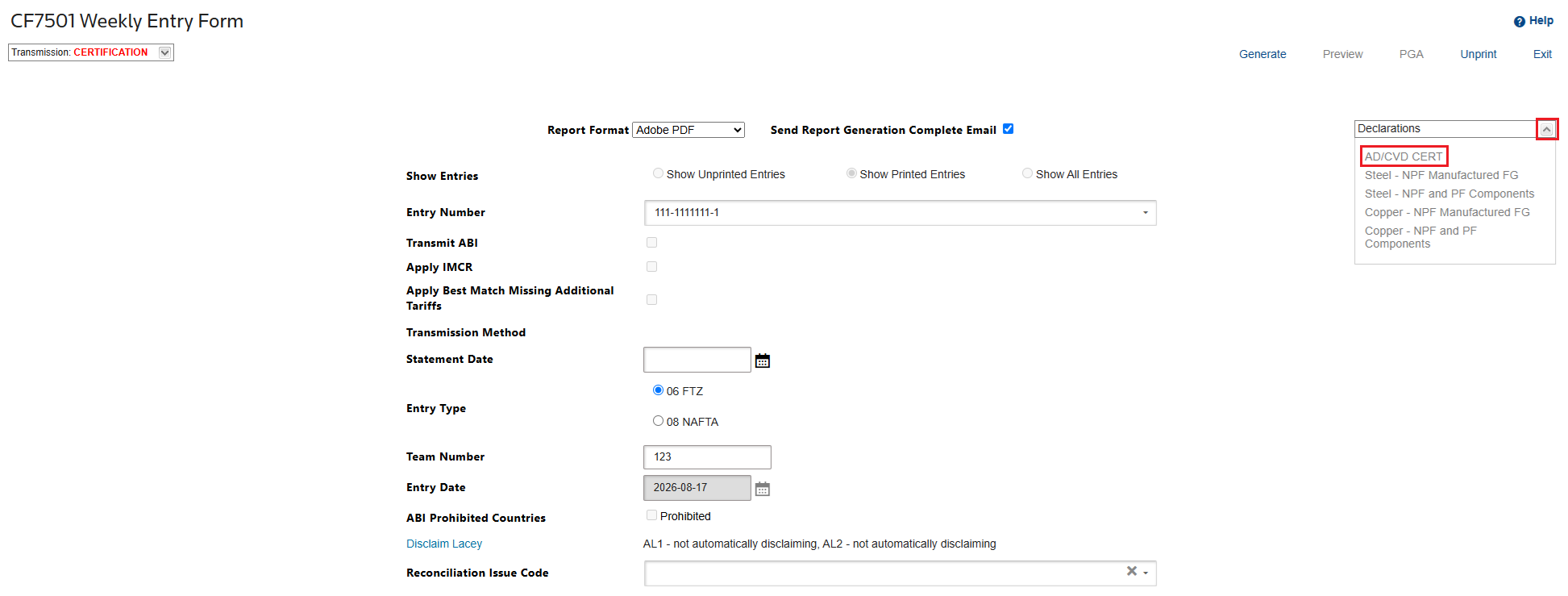
The system will auto-filter for all products on the entry in the “
AD/CVD CERT
” pop-up. You can mass-apply the AD/CVD Certification Designation by filtering and selecting applicable products in the grid. 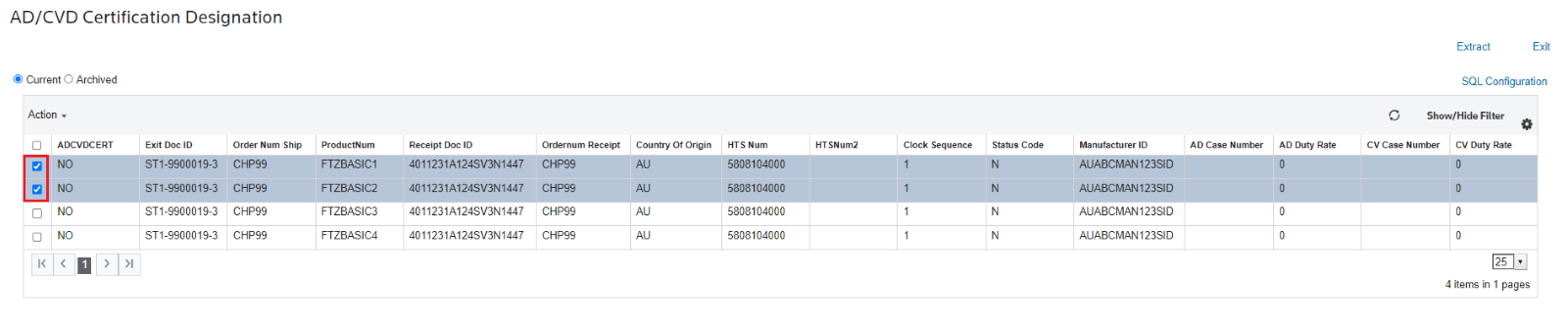
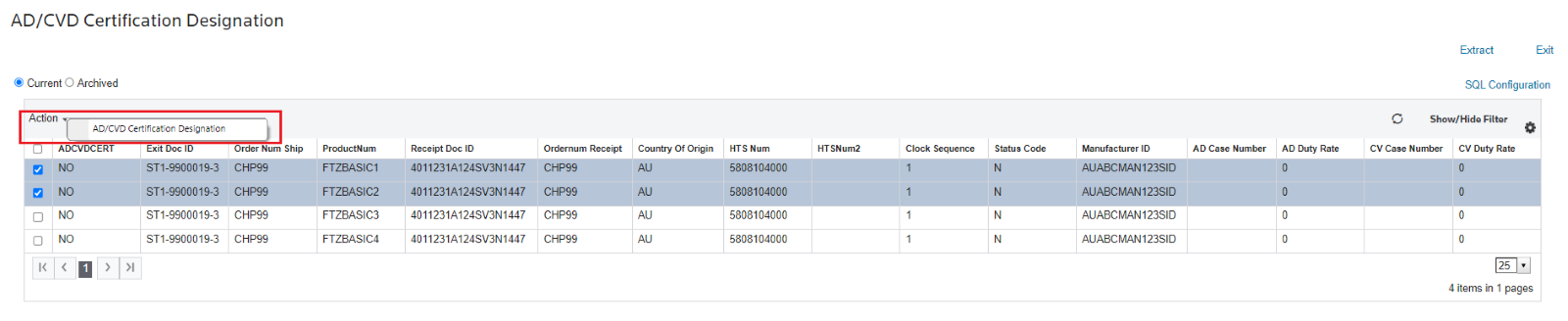
Select the “Action” of “
AD/CVD Certification Designation
”. 
Confirm that you understand that you will be assigning or unassigning the designation to the selected entry lines by clicking “
OK
” or select “Cancel
” to discontinue. 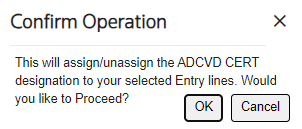
Select “
YES
” to assign to all of the selected lines or select “No
” to unassign to all of the selected lines. Click “Save
” to commit the choice. 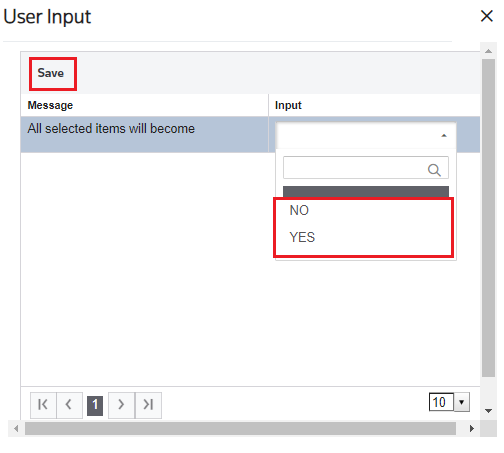
You will see that the AD/CVD Certification Designation has been saved.
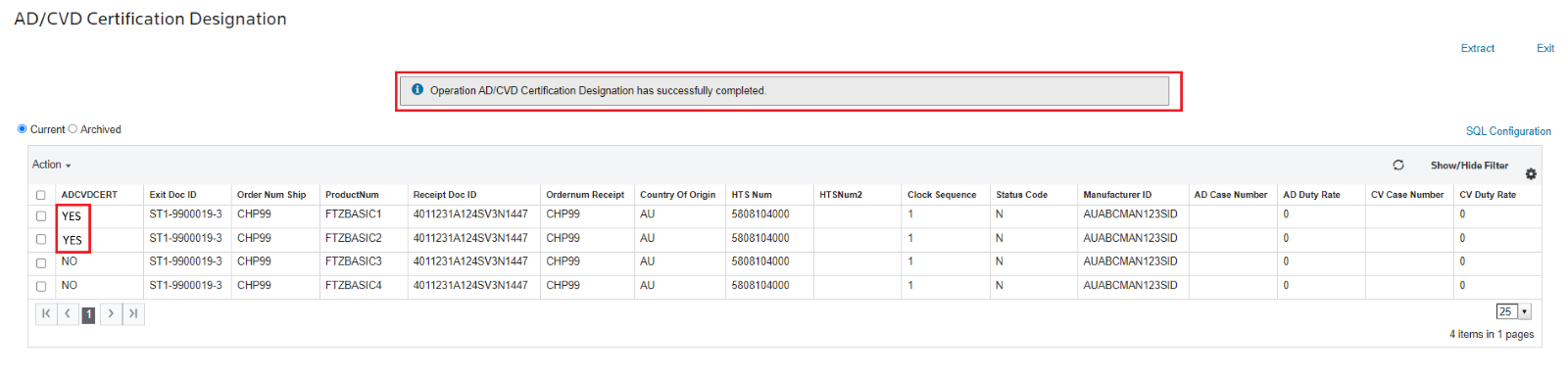
General Interface Information
- Inbound Interfaces – If you have an internal feed into ONESOURCE Global Trade that you wish to add/modify for AD/CVD Certification changes, you will need an *SOW project for Implementation/Testing purposes.
- Outbound Interfaces –
- Self-Filers - File updates for AD/CVD Certification data directly to CBP will automatically be made for these types of files.
- FTZ Broker Filers –
- If you utilize the ONESOURCE Global Trade Standard ACE CATAIR version - File updates for AD/CVD Certification will automatically be made.
- All other broker feeds or interfaces to third parties from ONESOURCE Global Trade will need an *SOW project for Implementation/Testing purposes.
*SOW Projects – The reason these require SOW projects is because every interface is unique to an operation and ONESOURCE Global Trade does not own the specifications. Time is needed to coordinate what should be transmitted between parties for each design and a test site available for testing. If you need an SOW project, please contact your account manager.
Steel Melt and Pour
Proclamation 10783 has been issued that requires new Steel Melt and Pour data elements for importers. These new data elements are required on the Entry Summary and guidance from CBP has been provided in CSMS 62095799 and
CSMS 62280558. Please review these documents to see if any of your products fall under the new reporting requirements.
We have created options on the 7501 Weekly Entry Form for you to key in the new data elements at the time of Entry Summary filing.
- FTZ Self-Filer – if you fill out the new data elements in the menu, the data will automatically be transmitted to CBP when you transmit your 7501.
- FTZ Broker Filer -
- Standard 7501 ACE CATAIR Interface to your broker – if you fill out the new data elements in the menu, the data will automatically be transmitted to your broker when you transmit your 7501. If your broker is not ready to accept this new data in the feed yet, simply do not fill out the new data fields in the option and your file will not change. You will, however, need your broker to transmit the new data to CBP for you. Please communicate with your broker to see what they would like you to do.
- Custom/Non-Standard 7501 Interface to your broker – your interface will not be automatically updated with the new fields, because your broker will need to communicate how they would like to receive the new data in the file. This will need to be an SOW to make the non-standard update and test the new format between ONESOURCE and your broker. If you fill out the new data elements in the menu, the data will not automatically be transmitted to your broker until this happens. You will need to work with your broker to have them transmit the new data to CBP for you, until the SOW to update your Custom/Non-Standard 7501 Interface is complete.
For FTZ filers, the options will show you all potentially applicable products on an un-generated (unprinted) entry that fall under the HTS listed by CBP. Based on the guidance provided and the data within the application, we are not able to indicate whether you must file for every part that shows in this new screen, but we have provided you the means to do so, should you wish to report.
As of 7/16/2026, if the Country of Origin is US, VI, GU, AS, UM, PR, or MP, the copper declaration is not required
The two options allow you to apply the same data to multiple lines, so you do not need to key this for every line, just every combination you need to file. If a line requires no reporting, do not select that line, or fill out any data.
- Steel – NPF and PF Components: for non-manufactured parts or PF components of manufactured parts.
- Steel – NPF Manufactured FG: for Finished Good parts that are classified with the impacted HTS. The FG HTS is what is reported, but we will show you all the NPF/PF components under it to help you research what you need to report.
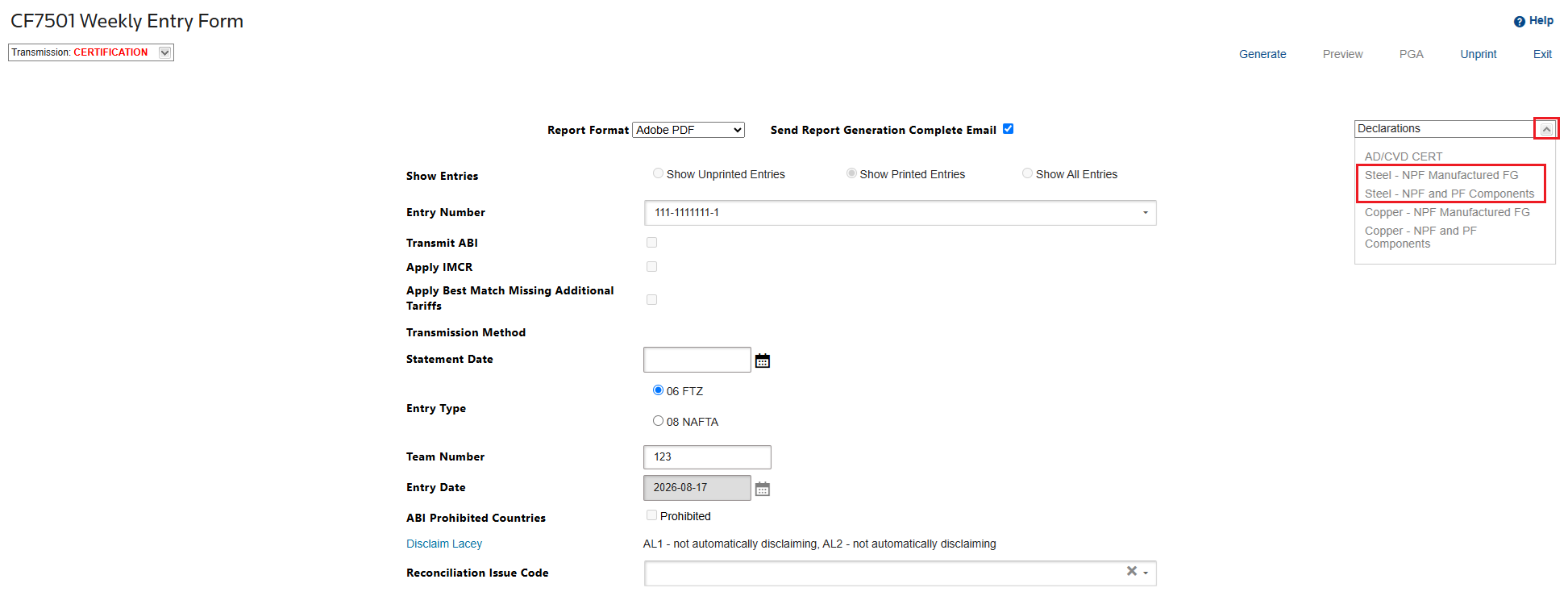
Both options can be found by clicking the
Declarations
box on the CF7501 Weekly Entry Form
:
To apply the data to lines that require reporting:
important
Both
Steel – NPF and PF Components
and Steel – NPF Manufactured FG
screens have the same procedure and can follow the instructions described below.- Check the boxes of the entry lines you want to apply the same data to.
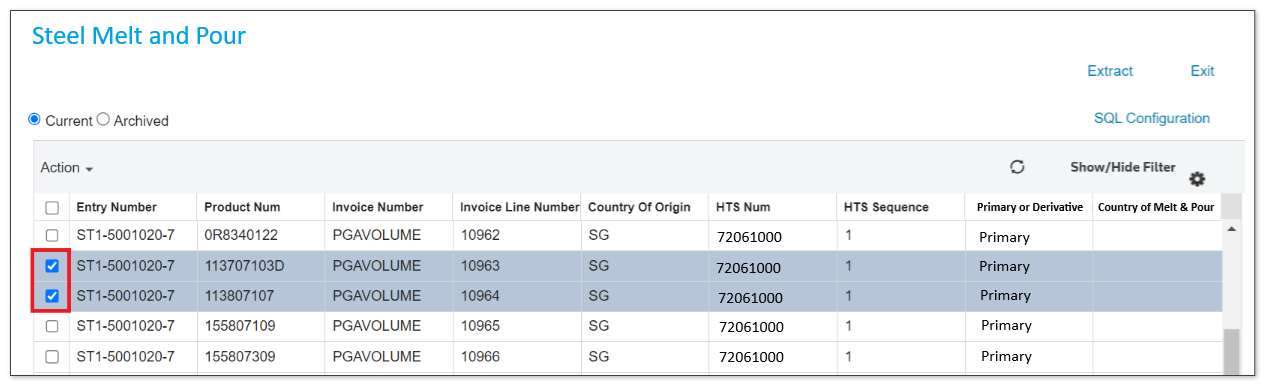
- Hover your cursor to theActionoption and clickSteel Melt and Pour.

- A pop-up will appear that alerts you that data will be applied. ClickOKif you wish to proceed. ClickCancelif you do not wish to change any data.
- TheUser Inputpop-up will appear. On the columnInput, click the dropdowns to select the answer to the messages described below.
 Country Melt/Pour *Derivative can be OTH:The information is required for articles of steel subject to the Section 232 steel articles and derivative steel articles. Type must be submitted if the article is primary steel or derivative steel regardless of whether the Section 232 duty treatment, quota treatment, or exception treatment applies.For products melted/poured in the U.S., report “US” as the Country of Melt and Pour.Provide the ISO country code where steel was originally melted. Country of melt and pour refers to the original location where the raw steel is (1) first produced in a steel-making furnace in a liquid state and then (2) poured into its first solid shape. The first solid state can take the form of either a semi-finished product (slab, billets, or ingots) or a finished steel mill product. The location of melt and pour is customarily identified on mill test certificates that are commonplace in steel production, generated at each stage of the production process, and maintained in the ordinary course of business. This data element is mandatory for all countries importing Primary Steel.For Derivative Steel Products of Mexico, the ISO Country of Melt and Pour code or ‘OTH’ may be provided.
 - ClickSavewhen all fields are filled out.After saving the input, a successful message is displayed, and the countries are displayed in the grid.
 If you determine you need to change data after the entry has been generated (printed), simply unprint the 7501. The Exit Doc ID and the fields will again be available for you to edit in the new menu screen.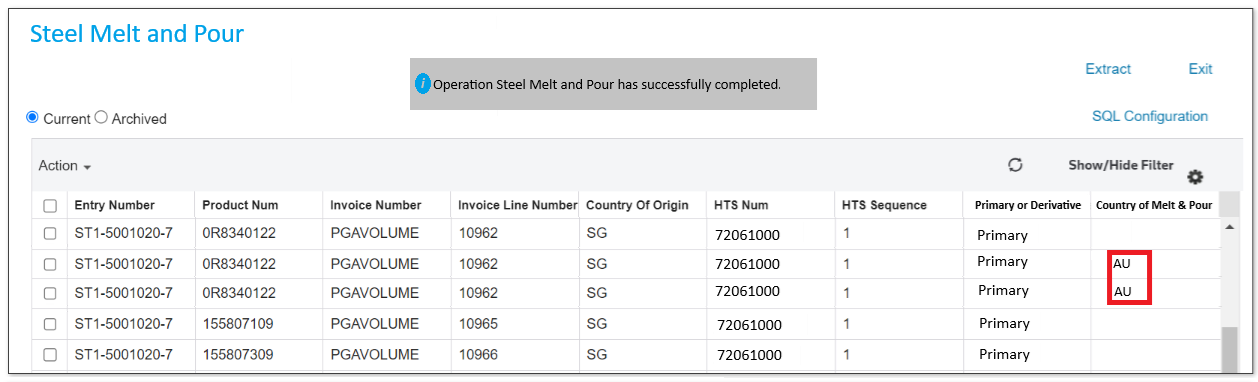
Extract
You can download your
Steel Melt and Pour
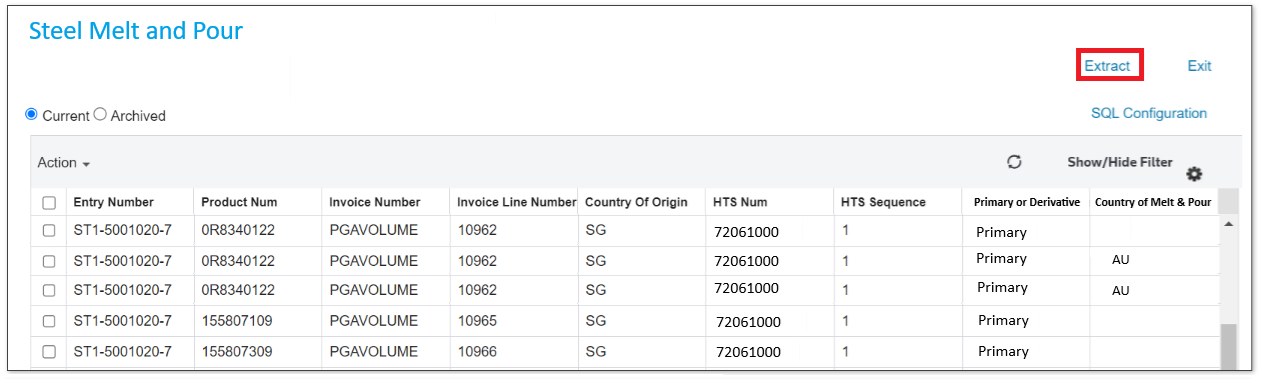
entry lines in an Excel spreadsheet by clicking the action button Extract
.
Copper Smelt and Cast
Proclamation 11021 (91 FR 18201) has been issued that requires new Copper Smelt and Cast data elements for importers. These new data elements are required on the Entry Summary and guidance from CBP has been provided in CSMS 69252300. Please review these documents to see if any of your products fall under the new reporting requirements.
For FTZ filers, we have created two options to enter the new data elements on your CF7501 Entry Summary. Both options can be found by clicking the Declarations box on the CF7501 Weekly Entry Form:
- Copper – NPF Manufactured FG: for Finished Good parts that are classified with the impacted HTS. The FG HTS is what is reported, but we will show you all the NPF/PF components under it to help you research what you need to report.
- Copper – NPF and PF Components: for non-manufactured parts or PF components of manufactured parts.
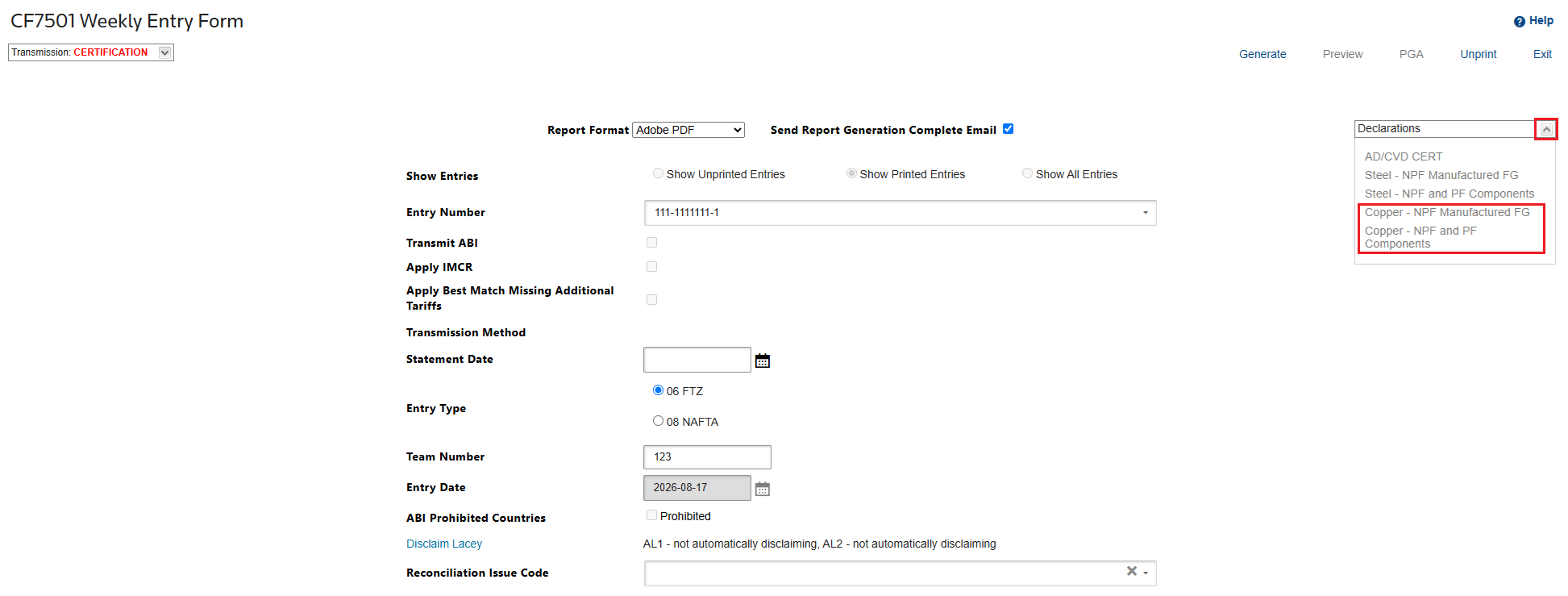
The Copper Smelt and Cast options allow you to apply the same data to multiple lines, so you do not need to key this for every line, just every combination you need to file. If a line requires no reporting, do not select that line, or fill out any data.
To apply the data to lines that require reporting:
tip
Both
Copper – NPF Manufactured FG
and Copper – NPF and PF Components
screens have the same procedure and can follow the instructions described below.- Check the boxes of the entry lines you want to apply the same data to.
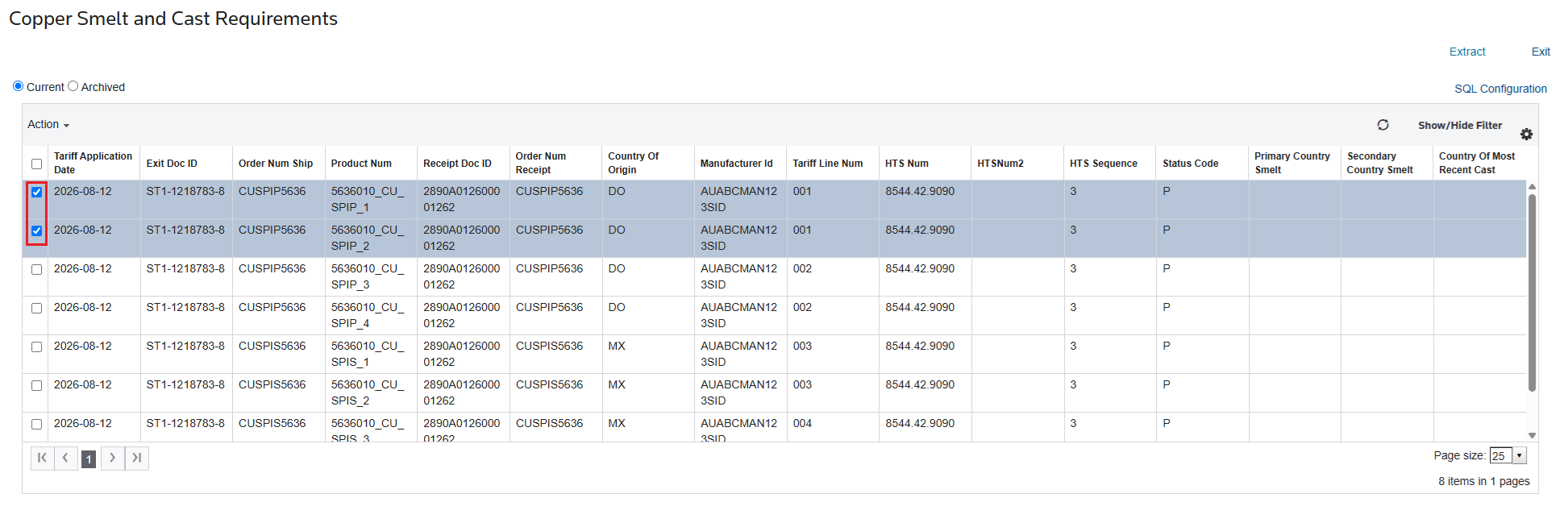
- Hover your cursor to theActionoption and clickCopper Smelt and Cast Requirements.
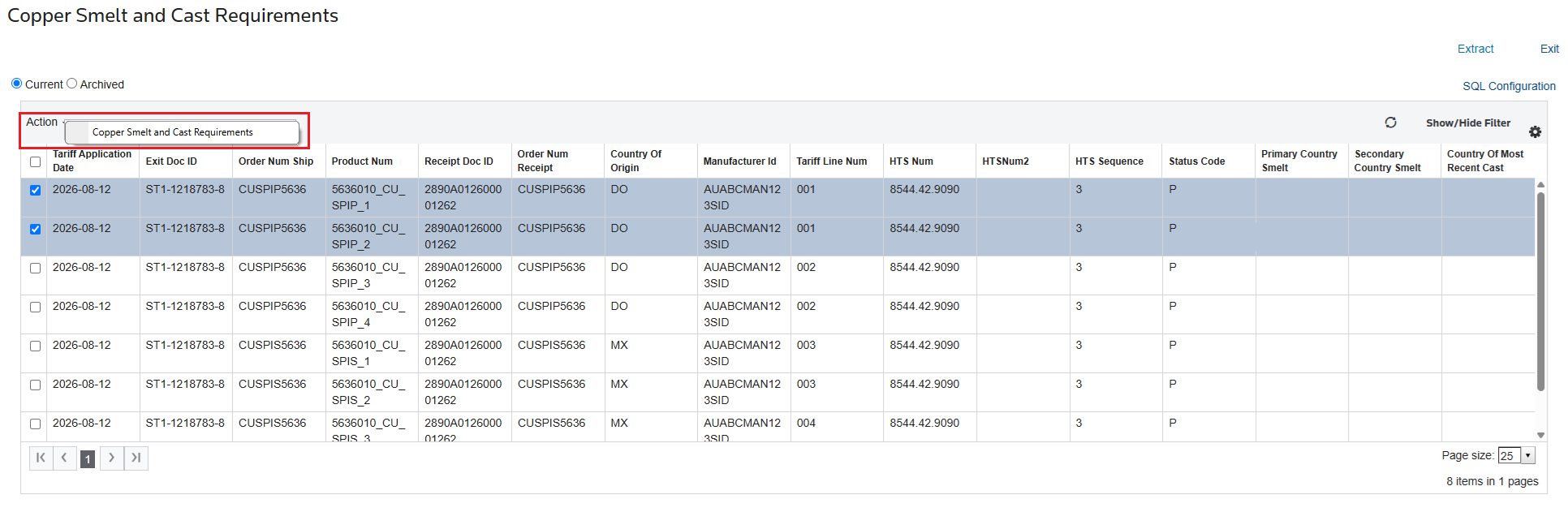
- A pop-up will appear that alerts you that data will be applied. ClickOKif you wish to proceed. ClickCancelif you do not wish to change any data.
- TheUser Inputpop-up will appear. On the columnInput, click the dropdowns to select the answer to the messages described below.
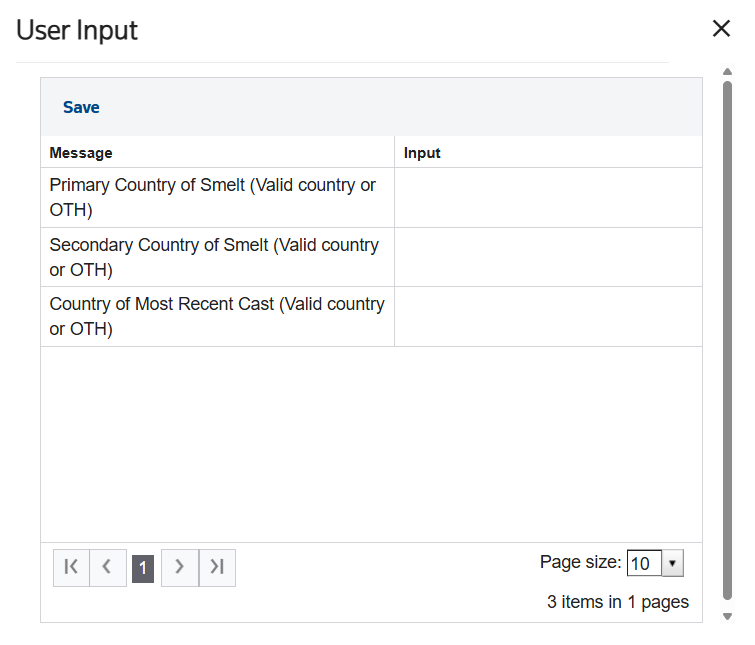
- Primary Country of Smelt (Valid country or OTH): Provide the ISO country code where the copper was originally smelted. If unknown, report "OTH." This field is mandatory.
- Secondary Country of Smelt (Valid country or OTH): If a secondary country of smelt applies, provide the ISO country code or "OTH." This field is optional.
- Country of Most Recent Cast (Valid country or OTH): Provide the ISO country code where the copper was most recently cast. If unknown, report "OTH." This field is mandatory.
- ClickSavewhen all fields are filled out.
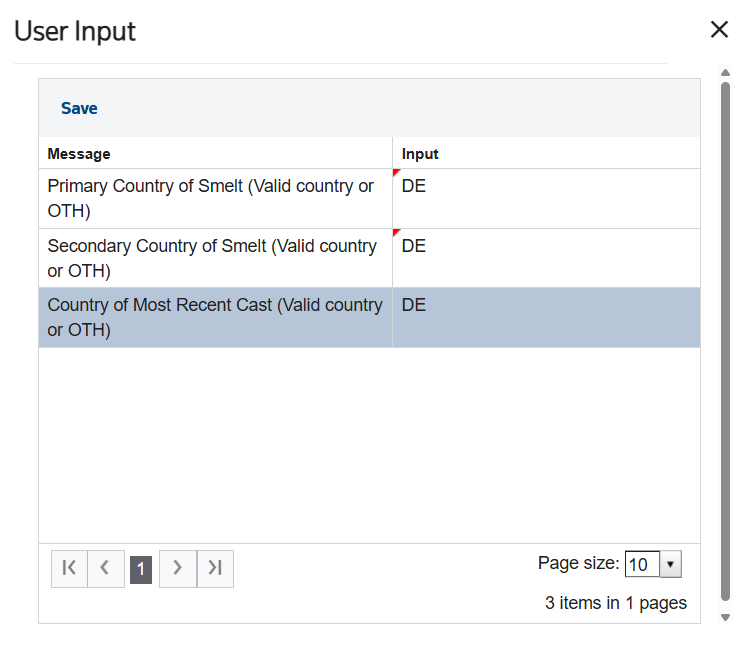
After saving the input, the countries are displayed in the grid.
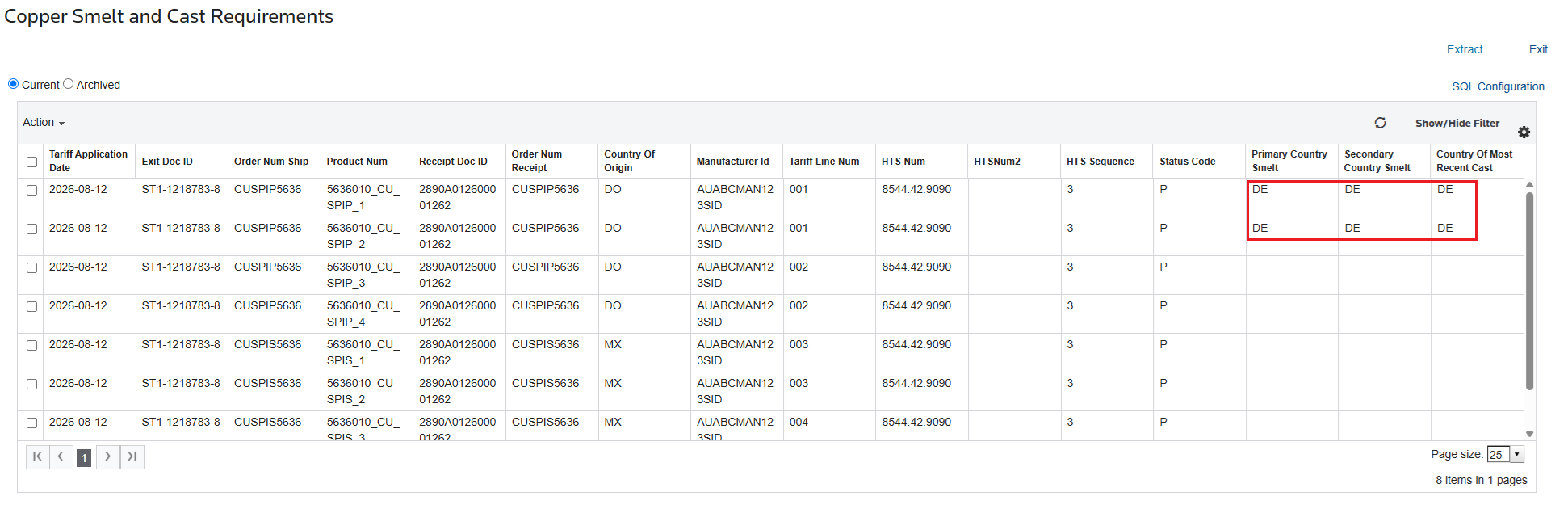
If you determine you need to change data after the entry has been generated (printed), simply unprint the 7501. The Exit Doc ID and the fields will again be available for you to edit in the menu screen.
Extract
You can download your Copper Smelt and Cast entry lines in an Excel spreadsheet by clicking the
Extract
button.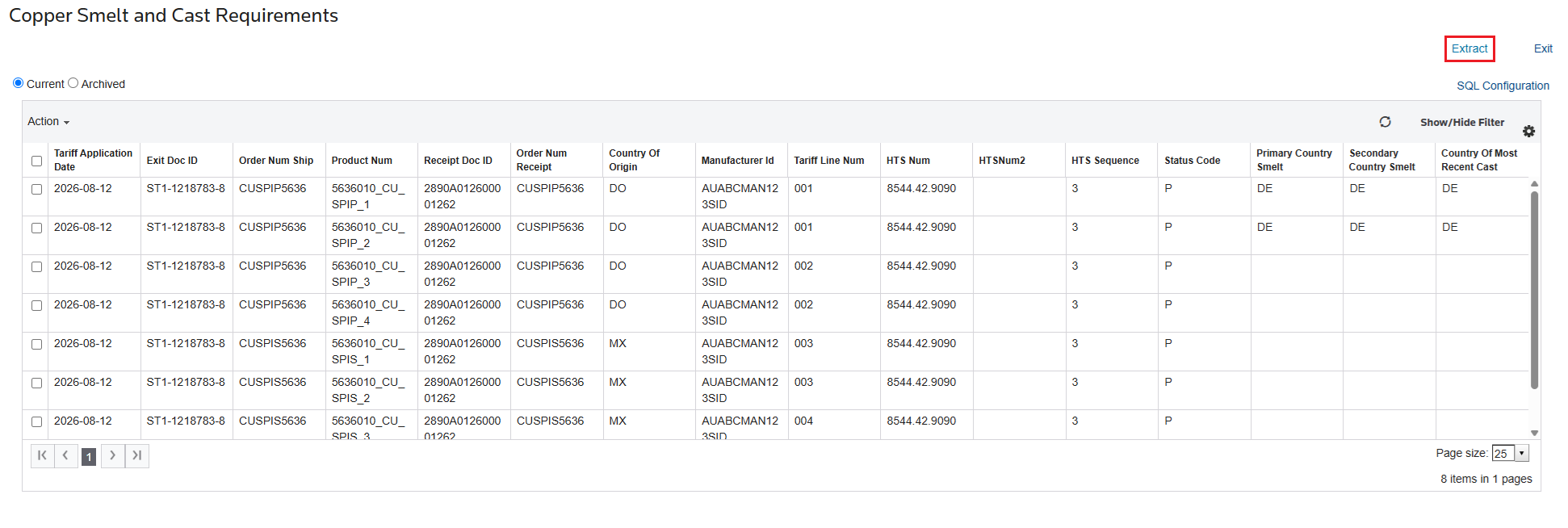
Using Review Missing Additional Tariffs and Adding in Item Master Custom Rules to update 7501 Entry Lines
There may be scenarios where some additional tariffs are already added to a layer, but more tariffs need to be added.
important
Consider the following example:

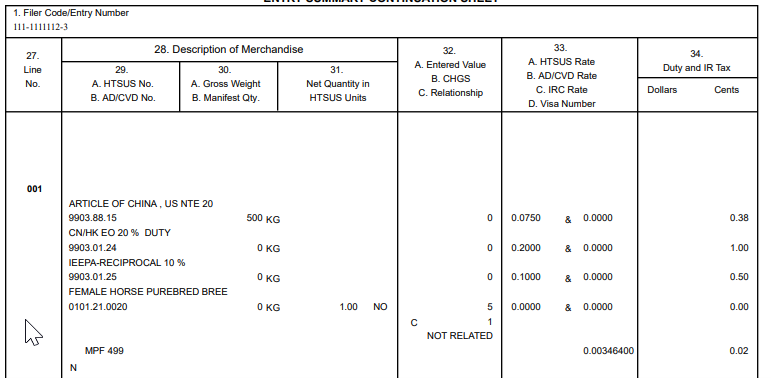
In this example, Section 301 and IEEPA-R Chapter 99s are present; however, based on the
ReceiptDate
, IEEPA-F Chapter 99 is also required. To apply this HTS, a new Item Master Custom Rule can be set up if certain specifications are on the rule:- The main MatchHTSIndex should always be the HTSSequence 1. In this case, this refers to the Section 301 Chapter 99;
- For each HTS already existing on the layer, mark as a Match Record and populate the “Match HTS Number” in the defined ordering;
- The missing HTS should not be defined as a Match Record, which tells the system to add this HTS in the defined order;
- The StartEffectiveDate should be backdated to when the rule is first active. This is important because the system uses the date to determine whether to apply a rule or not during Entry Generation.important
- For P status layers, the system will use the ReceiptDate to determine if a rule is applicable.
- For N status layers, the system will use the EntryDate to determine if a rule is applicable.

After the rule has been added, generate the entry, ensuring that the
Apply IMCR
box is checked.
After entry generation, it is possible to see the applied rule and the additional tariffs on the line.
 Article