
Review Wizard on Web is here!
We're excited to announce that Review Wizard for web browsers is now available to everyone! Now, when you open an
In Verification
binder from FileRoom, you will open a new tab within your browser. From here, you can proceed with the verification process on any operating system with no additional software installation needed!With this new Review Wizard experience comes an updated design when completing the Pre-Verification, Verification, Superseded, Child Form Association, etc. steps in 1040SCAN.
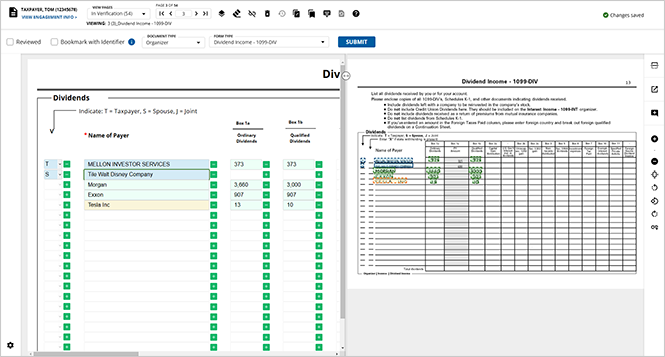
note
Review Wizard on Web is an optional feature that either your firm can enable at the domain-level in Account Admin, or individual users can enable within FileRoom. All UltraTax users will transition to Review Wizard on Web by December 2025.
We strongly encourage all UltraTax users to begin training their users in Review Wizard on Web when it’s made available.
Benefits of using Review Wizard on Web
- No Installation Required:Access the application directly through a web browser, eliminating the need for software installations and updates.
- Easy Integration:Seamlessly integrates with existing platforms, enhancing compatibility and workflow efficiency (e.g., UltraTax)
- Operating System Agnostic: Ability to verify on Microsoft Windows, Apple Mac, and Linux with the most current web browsers.
- Enhanced User Experience:Enjoy a modern interface with intuitive navigation and improved usability compared to the old desktop version.
- Auto-Save Functionality:Prevent data loss during unexpected closures with the auto-save feature, ensuring data integrity and security.
- Improved Performance:Experience faster navigation from one review step to another.
- Advanced Error Handling:Benefit from sophisticated backend error management that minimizes interruptions, providing a smoother user experience.
How can I start using Review Wizard on Web?
Domains can set Review Wizard on Web as their firm-wide preference from the
ACCOUNT SETUP
section of Account Admin
. Once in ACCOUNT SETUP
, navigate to 1040SCAN Default Version
.note
Only users with the
Account Setup
permission will have access to the 1040SCAN Default Version
tab. Select the
1040SCAN Desktop (or) 1040SCAN Web
option to set Review Wizard on Web as your domain-wide default.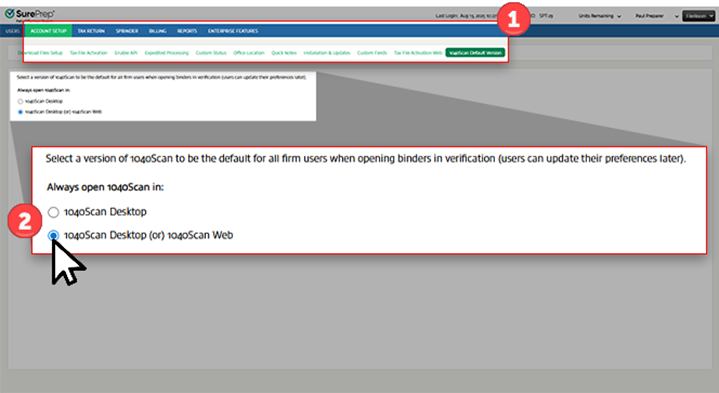
Using Review Wizard individually
Using Review Wizard individually
Having the
1040SCAN Desktop (or) 1040SCAN Web
option in Account Admin
will enable this feature for users across your entire domain. If you'd prefer only some users in your domain use Review Wizard from Web, they can do so from within FileRoom. To use Review Wizard on web individually, users can find the binder they've like to verify within FileRoom, then point to the OPTIONS
column. 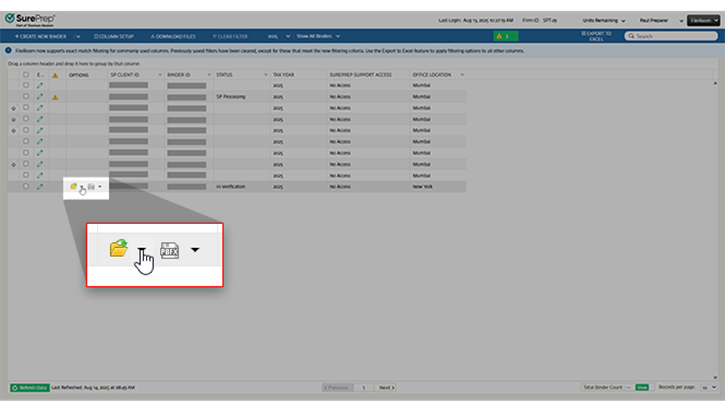
Expand the dropdown menu from the
Open
icon and select 1040SCAN Web
to open the binder in Review Wizard in your browser. Moving forward, each In Verification
binder you open using the Open
icon will be opened within your browser!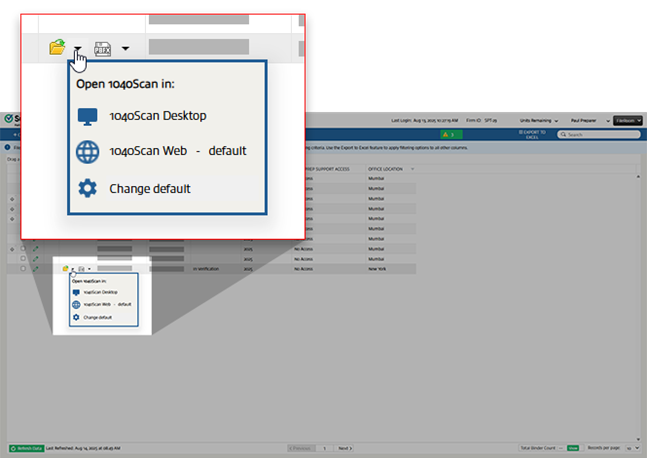
FAQ
- Does my firm have to use Review Wizard on Web when it’s available?No, while we do encourage firms to utilize the new Review Wizard experience, you will have the option to continue using the classic Review Wizard experience. It’s important to note thatall UltraTax users will transition to Review Wizard on Web by December 2025. We strongly encourage all UltraTax users to begin training their users in Review Wizard on Web when it’s made available.
- Will changes made in Review Wizard on Web sync with the classic Review Wizard and vice versa?Yes, any changes you make in either version of Review Wizard will sync to the other, avoiding data loss for either platform.
- Can I set a default method of opening Review Wizard?Yes, if you'd like to configure a default Review Wizard method you can do so from FileRoom. After expanding the Open menu for a binder, select Change Default. Here, you can choose between setting your default to either 1040SCAN Desktop or 1040SCAN Web. Select Save once you've made your choice.
- Will my selected default impact other firm user's Review Wizard default?No, your selected default will only apply to you and will not impact others' Review Wizard experience.Where can I learn more about how to use Review Wizard 2.0 on Web?Documentation for Review Wizard on Web will be made available when the feature releases on August 25! When trying the new feature, users can consult the Review Wizard documentation to answer any questions they may have.
Related Content
-
Announcements
Format: Article
-
Activate Review Wizard on Web
Format:
Article
-
Step 1 - Pre-Verification
Format:
Article
-
Step 2 - Verification
Format:
Article
-
Step 3 - Superseded Documents
Format:
Article
-
Step 4 - Child Form Association (CFA)
Format:
Article
-
Step 5 - Duplicate Data
Format:
Article
-
Step 6 - New Form Review (NFR)
Format:
Article
-
Step 7 - Finalization
Format:
Article

