
File a client's questionnaire
As a tax professional, you can use TaxCaddy to send your clients a questionnaire that will help you prepare their tax return.
Filing a client's questionnaire preserves your client's responses and archive the answers in their current state. When you file a client's questionnaire, TaxCaddy locks the questionnaire from any further edits by your client, and prints a PDF copy as an uploaded tax document.
Follow these steps to file a client's questionnaire to their uploaded documents tab:
- Sign in to TaxCaddy. On theOverviewscreen, select the client tile to go to the Client Profile.

- SelectQuestionnaire.

- The questionnaire progress displays, with the client's answers following each question. SelectFILE TO TAX DOCUMENTS.noteOnce you file the questionnaire to Tax Documents, the client can't answer or edit any questions and theFILE TO TAX DOCUMENTSbutton isn't available.

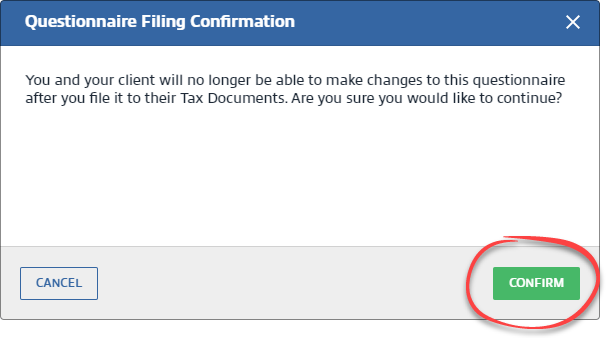
- TheQuestionnaire Filing Confirmationwindow will appear. If you are sure you want to file the questionnaire to Tax Documents, selectCONFIRM. Confirmation will appear when the questionnaire successfully prints to PDF format.
 The questionnaire is filed to , in theQuestionnairecategory.
You and your client will be able to see the printed PDF copy of the questionnaire. Additionally, personal information (e.g. Driver's License, mailing address) requested from the client will appear in the questionnaire.

note
When the client's binder is created, the questionnaire will be auto indexed in the Organizer section of the binder. When you introduce a new tax year in TaxCaddy, any unfinished questionnaire tasks from the previous tax year are automatically filed to their account's
Uploaded Documents
for that tax year. When you upload a tax return to your client's TaxCaddy account, all unfinished questionnaires from the previous year and current year will automatically be filed to their account's Uploaded Documents
for the respective tax year.note
Your clients can't modify their answers after the questionnaire is filed (that is, printed and uploaded as a tax document). To restore the questionnaire, delete the uploaded the PDF copy of the questionnaire.
Related Content
-
Restore a filed questionnaire
Format: Article
-
Send questionnaires to clients
Format:
Article
-
Restore a filed questionnaire
Format:
Article

