
Creating or editing a Federal Tax Summary
The
Tax Summary
panel in TaxCaddy gives you and your clients a high-level overview of a client's tax return without having to go through individual tax returns in a client's profile. There are 3 ways of entering adding tax summary to your client's profile:- Type the Tax Summary manually
- Fetch Tax Summary (CCH Axcess Tax & GoSystem Tax RS only)
- Auto-populate Tax Summary by uploading a client's tax return(All tax software).
In this article, we'll show you how to manually enter the
Tax Summary
information.Create/Edit Tax Summary
Follow these steps to create or edit a Federal Tax Summary.
- Log in to TaxCaddy.
- On theOverviewscreen, select a client tile to view the client profile.

- SelectTax Returns.

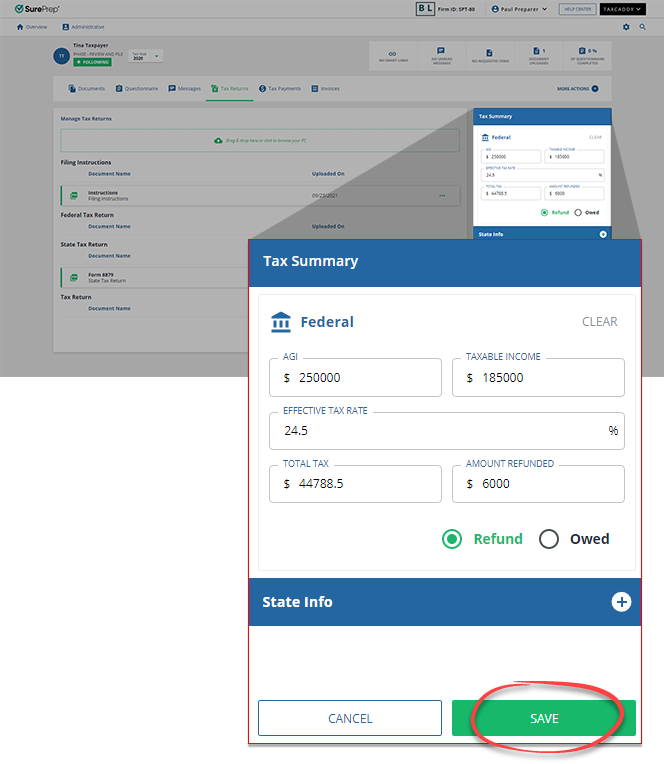
- SelectEDITin theTax Summarypanel.

- Enter your data inAGI,TAXABLE INCOME,EFFECTIVE TAX RATE, andTOTAL TAX. Select eitherOwedorRefund, and type your data inAMOUNT OWEDorAMOUNT REFUNDED. SelectSAVEto save your changes.
Related Content
-
Clearing a Federal Tax Summary
Format: Article
-
Creating a State Tax Summary
Format:
Article
-
Editing a State Tax Summary
Format:
Article
-
Clearing a State Tax Summary
Format:
Article
-
Deleting a State Tax Summary
Format:
Article

