
Annotations overview
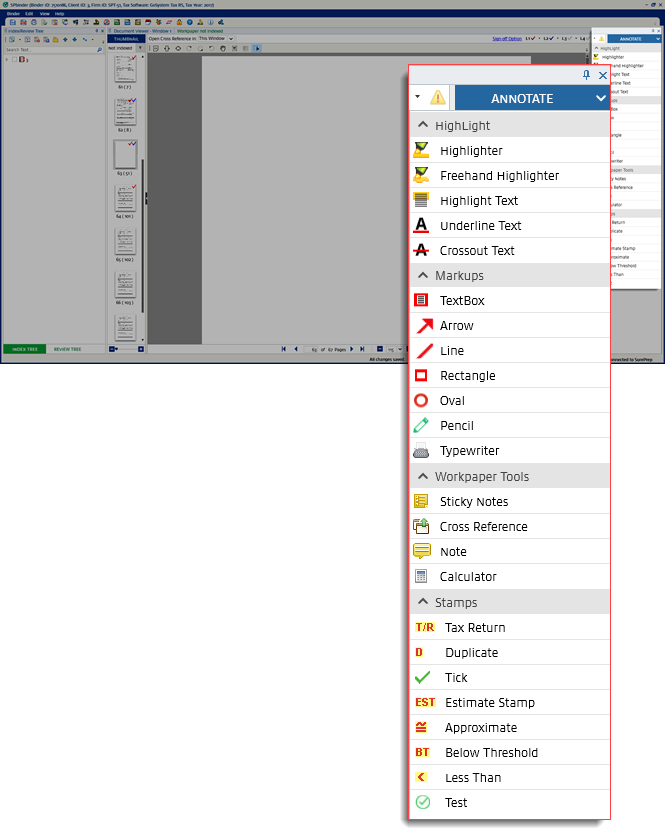
The following annotations can be used:
Annotate categories | Description |
|---|---|
Highlight | Lets you highlight, underline, and cross-out text. |
Markups | Lets you draw shape annotations. |
Workpaper Tools | Lets you use tools that can help you calculate, place notes, and cross-reference. |
Stamps | Lets you place stamps on the documents. You can use the default SurePrep stamps or use your firm's custom stamps. |
note
Annotate features are available based on the document file type.
You can select the dropdown  icon on the top of the panel to switch between
icon on the top of the panel to switch between ANNOTATE
and CALCULATOR TAPES
.
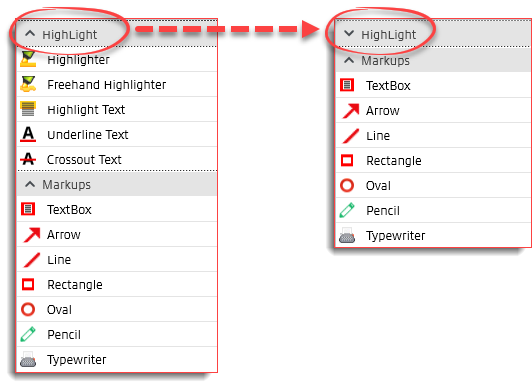
To hide any of the options under this section, select the arrow next to that option. To view the option, select on the arrow again  .
.
.
All these annotations can be used multiple times when selected. Re-select the selected option to turn off the feature.
All the annotations placed on the document can be deleted at once. To do this, drag your mouse pointer to select all the annotations and press
Delete
on your keyboard.Related Content
-
Highlight
Format: Article
-
Markups
Format:
Article
-
Workpaper Tools (sticky notes, cross-references, notes)
Format:
Article
-
Stamps
Format:
Article
-
Calculator
Format:
Article
-
Show and hide annotations
Format:
Article

