
View client profiles
Each client added to your firm has a client profile. Viewing a client's profile connects you to your client's account and lets you manage and view their tax documents, questionnaires, tax returns, and tax payments.
Follow these steps to view Client Profiles:
- Sign in to TaxCaddy.
- If this is your 1st time viewing theOverviewscreen, selectSearch All Clients.
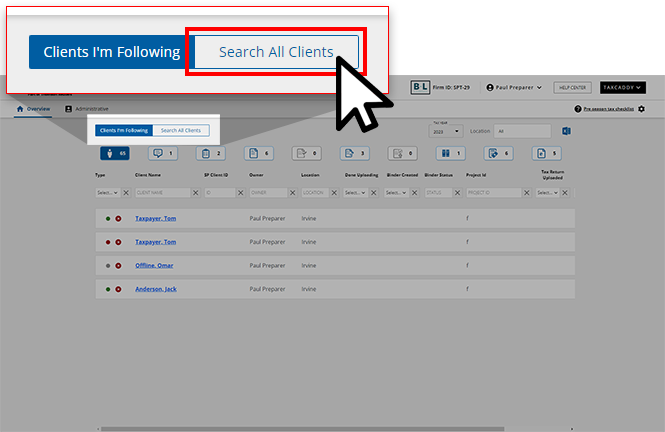
- In theSearchbar, you can search for a client by their First Name, Last Name, SP Client ID, Tax Client ID, Binder ID, Custom Field, Owner's Name, and Office Location. When you find a client, select the client tile to visit their profile.noteYou may not be able to accessClient Profileif binder restrictions are turned on.
 Clients you are following or assigned to will appear in theClients I'm Followingtab.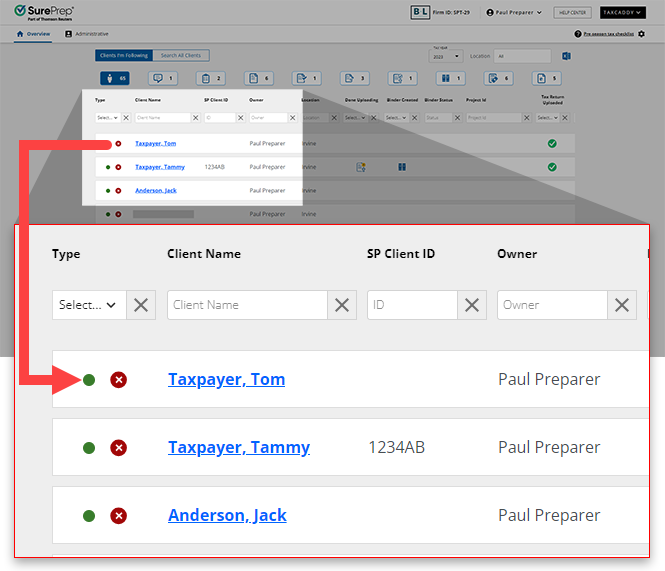
Summary
When a client's profile opens, a summary of the client's activity is available at the top.

Client Confirmation
In some instances, a newly added client profile may need to be verified for authenticity before you and the logged-in user can see each other's requests and activities. On the
Client Confirmation
window, your firm can decide how to use the user information. 
Navigate a client's profile
Go to your client's
Documents
, Questionnaire
, Messages
, Tax Returns, Tax Payments
, and Invoices
sections using the navigation menu.
Follow/Unfollow client
Follow or unfollow the client using the
FOLLOW/FOLLOWING
button. Followed clients are on the Clients I'm Following
tab on the Overview
screen.
note
You can also select
Unfollow
on the Overview
screen to unfollow the client.More Actions
The
MORE ACTIONS
menu allows you to complete certain actions in your client's profile.
Menu option | Description |
|---|---|
View Personal Information | View personal information that your client provided when they were completing the questionnaire. |
Manage Smart Links | Add, remove, update, or fix the client's Smart Links using the Manage Smart Links option. note
Assigning one or more additional members will automatically restrict access to the TaxCaddy Client Profile and associated binder to assigned members only. |
Member Engagement Team | Add or remove members that can oversee the client profile. Only Owners and users with User Group, then Assign Members permissions can add or remove members. |
7216 Consent | You will see have the 7216 Consent option if your firm turned on 7216 access restrictions for offshore users. When enabled, (offshore) users with 7216 access restrictions won’t be able to access the client profile. To allow access to (offshore) users, a Firm System Administrator or another user with access to the client profile can update 7216 consent as Received. |
Add Form 1041 | Add a separate tax return profile if the client also has a 1041 tax return. |
Edit Existing 1041 | Edit an existing 1041 tax return profile (for example, Name of trust, tax software details, and more) |
Related Content
-
Activity Feed
Format: Article
-
Summary Panel
Format:
Article
-
Client Info
Format:
Article
-
Client Confirmation
Format:
Article
-
Follow clients
Format:
Article
-
View client's personal information
Format:
Article
-
Update 7216 consent from TaxCaddy client profile
Format:
Article
-
Instant Access to clients profiles
Format:
Article
-
Troubleshooting: Unable to access client profile
Format:
Article
-
Client Info
Format:
Article
-
Summary Panel
Format:
Article
-
Follow clients
Format:
Article

