
Textbox annotations
The notes and textbox annotations let you place special notes, textboxes, and type fields in a document. Use notes and textbox annotations when you need to bring attention to the document, replace a text, or place a note reminder for yourself.
Textboxes
Use  to add a borderless text field where you can enter your text. The textbox outline will disappear once you deselect the textbox.
to add a borderless text field where you can enter your text. The textbox outline will disappear once you deselect the textbox. 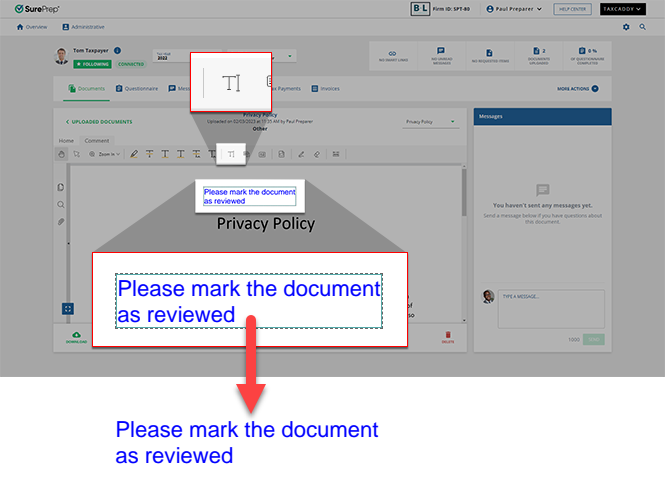
Use  to place a textbox with an arrow pointing to a specific spot. To place a callout, select where you would like the arrow to point, drag your mouse pointer to the location you'd like the textbox to be, then release your mouse to finalize the textbox location.
to place a textbox with an arrow pointing to a specific spot. To place a callout, select where you would like the arrow to point, drag your mouse pointer to the location you'd like the textbox to be, then release your mouse to finalize the textbox location. 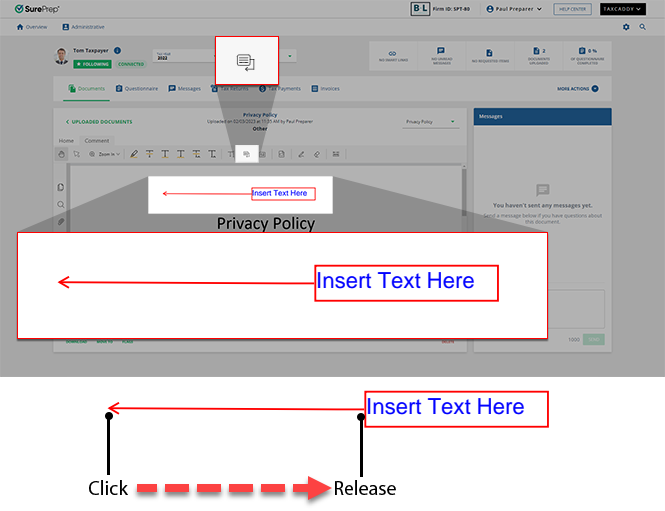
Use  to place a textbox with a red border. Select a location in the document to place a textbox.
to place a textbox with a red border. Select a location in the document to place a textbox. tip
To draw a textbox to a specific size, select and hold on the document, then drag, and release to finalize your size.

Related Content
-
Document Viewer (PDF Viewer)
Format: Article
-
Text annotations
Format:
Article
-
Shapes annotations
Format:
Article
-
Change annotation style
Format:
Article
-
Delete annotations
Format:
Article
-
Viewing clients' tax documents
Format:
Article

