
How do I check the status of the interfaces?
On the
Interface Status
screen, you can view when the status of interfaces (that have not yet been executed) has changed because of an action taken by a system user. These actions, such as suspend, cancel, and reactivate, are done on the Data Imports/Exports
screen.- Access the menuInterface > Interface Status.
- On theInterface Statusscreen, fill in the filter fields with the data for the interfaces you want to check for the statuses and clickFilter.
According to the search, the records of the interface status changes are displayed in the table.
tip
Table data can be organized using the  ,
,  and
and  buttons.
, and buttons. important
If the interface schedule is deleted, the status change records for that interface are also deleted.
Exporting Status
You can export the table information to an Excel file. To do this, check the desired records and click  , for example: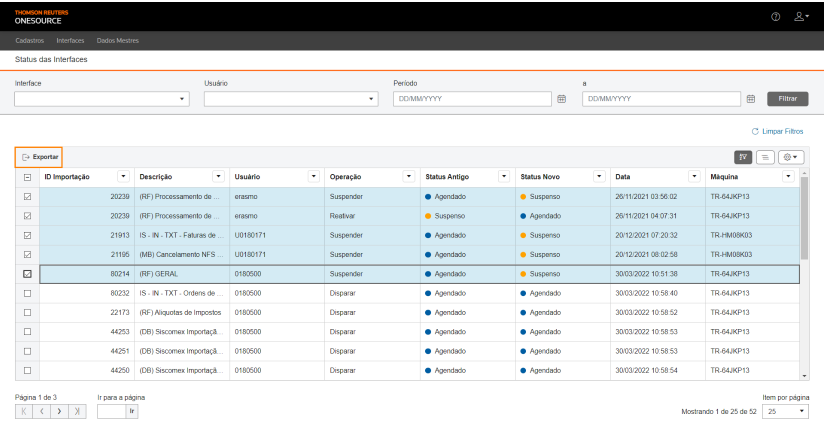
Export
, for example:, for example:
attention
To export data from all rows in the table, this marking is not required.
Related Content
-
How do I create and manage interface groups in In Out?
Format: Article
-
How do I register and configure interfaces in In Out?
Format:
Article
-
How do I create and manage interface schedules?
Format:
Article
-
How to monitor and manage data imports/exports in In Out?
Format:
Article
-
How do I take manual appointments of interfaces in In Out?
Format:
Article
-
How to register and manage machines in In Out?
Format:
Article
-
How do I set up notifications from users and entities in In Out?
Format:
Article