
Switch between tax documents
The Document Viewer panel's quick access feature lets you switch between documents without going to another page.
note
The Document Viewer panel's quick access feature is only available for uploaded documents, tax returns, tax payments, and invoices.
To switch documents, select the dropdown  arrow.
arrow.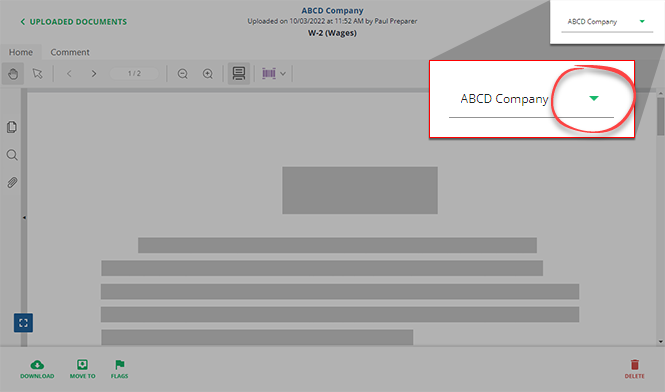
Select a document from the dropdown list.

The Document Viewer panel will switch to the new document.
Related Content
-
Document Viewer (PDF Viewer)
Format: Article
-
Text annotations
Format:
Article
-
Shapes annotations
Format:
Article
-
Change annotation style
Format:
Article
-
Delete annotations
Format:
Article
-
Shapes annotations
Format:
Article
-
Change annotation style
Format:
Article
-
Delete annotations
Format:
Article
-
Change annotation style
Format:
Article
-
Delete annotations
Format:
Article
-
Delete annotations
Format:
Article
-
Mark documents as Viewed and Unviewed
Format:
Article
-
Manage Done Uploading status for the client
Format:
Article
-
Document validation check
Format:
Article
-
Document flags
Format:
Article
-
Delete documents
Format:
Article
-
Move documents to another category or tax year
Format:
Article
-
Download multiple documents at once
Format:
Article

