
What's new in Contract Express 10?
August 2026 (Release 10.24)
Author Online
Navigate straight to each reference from Find references
Building on last month's "Find references" option, each result now links directly to its location, so you can jump straight to the exact spot a variable is used instead of searching for it manually.

See Manage Variables, Groups, and Pages within Questionnaire for more information.
Countable variables now in the computables list
Countable variables now appear alongside your other computables, making them easier to find and reuse as you build out your template.
See Whole number Variable for more information.
Validate expressions with one click
A new validation button in the Advanced Mode toolbar lets you confirm an expression is valid before moving on, so you can catch syntax errors sooner.

See Using Advanced Mode for more information.
Jump straight to a variable in the Questionnaire
A new "View in questionnaire" link on the variable details form in Advanced Mode takes you directly to the selected variable, so you can see it in context without losing your place.
See Using Advanced Mode for more information.
July 2026 (Release 10.23)
Author Online
Side menu navigation
Author Online now includes a categorised side menu, letting you navigate directly to the relevant Template Setup tabs, making it faster to move between different areas of your template.

Duplicate Variables, Groups and Pages
Save time rebuilding similar structures, duplicate variables, groups, and pages directly in the Questionnaire instead of recreating them manually.

See Manage Variables, Groups, and Pages within Questionnaire for more information.
Find references of a variable
Quickly see everywhere a variable is used across your template with a new "Find references" option in the variable's context menu, making it easier to review and manage dependencies.

See Manage Variables, Groups, and Pages within Questionnaire for more information.
Improvements to the Advanced Mode expression editor
Advanced Mode now includes a dedicated action toolbar (with Undo/Redo), the ability to view and edit variable details without leaving the expression editor, and quick-access help links for functions and operators.

See Using Advanced Mode for more information.
Faster access to variable details from Markup
A new
View in questionnaire
link on the Markup
tab lets you jump straight to a variable in the Questionnaire, where you can access additional variable settings.
See Insert Field for more information.
Locales
Clarified currency symbol placement settings in Locales
The currency formatting options in the Locale profile settings (
Currency Amounts as Digits
) now use clearer, plain language for the currency symbol placement and display in front or after the amount.Login Page Customisation
Re-instated ability to customise login pages
Single-tenant and OnPrem customers can apply login page customisations via web config settings.
June 2026 (Release 10.22)
Author Online
Import variables
Save time and maintain consistency across your template library by importing variables directly from an existing template into the one you are working on. A guided dialog lets you search for a source template, select the variables you need, and bring them across as local variables, preserving their original properties without manual re-entry.

See Import variables from a template for more information.
Multiple conditions for Custom warnings and markup Spans
Build more precise and dynamic document logic by combining multiple conditions on custom warnings and markup spans using And/Or operators. Conditions can be individually created, edited, collapsed, and deleted from a consolidated list, giving you full control over when a warning triggers or a span resolves, without complex workarounds.

See Add Custom Warnings to Questionnaire and Insert Span for more information.
AI Explanations for expressions with errors
When an expression contains errors, AI Explanations now surfaces a dedicated error section alongside targeted suggestions, helping you understand what went wrong and resolve issues more quickly.

See AI Expression Explainer for more information.
Improvements to the Advanced mode expression editor
The expression editor in Advanced mode now displays suggestions in a consistent, predictable order - variables, functions, operators, and parameters, each sorted alphabetically, and shows additional detail about the type of each suggested item, making it faster to find and select the right suggestion.

See Using Advanced Mode for more information.
Formatting enhancements
Formatting enhancements
Additional text formatting options for Rich-text editor toolbar
Users can now apply text colour, background colour, and font directly from the rich text editor toolbar, enabling richer and more visually consistent formatting of rich text content across questionnaires and guidance.
See Multi-line text Variable and General Tab for more information.
Documents
Documents
Optimised Download as zip for bulk-created contracts
(standalone Contract Express only)
The
Download as zip
action now pre-processes documents in batches before packaging them, preventing timeouts that could occur when downloading contracts that were recently created via bulk upload, ensuring a more reliable experience for high-volume workflows.See Managing multiple documents for more information.
May 2026 (Release 10.21)
Author Online
Variable occurrence navigation
Easily locate every place a variable is used in your template. When a variable is expanded in the Questionnaire, the total number of occurrences is shown alongside navigation arrows, letting you move through each instance and see it highlighted directly in the document, making it easier to review and manage complex templates.

See Setup Questionnaire in Author Online for more information.
Improved Questionnaire Navigation
The
Pages
and the Groups/variables
in the Questionnaire wide view now scroll independently, so you can navigate long variable lists without losing your place in either panel.
See Setup Questionnaire in Author Online for more information.
Author Desktop
Entity variables now listed in template-defined order
When selecting entity properties to include as variables in your template, they are now presented in the order defined in the entity template rather than alphabetically, giving you a more intuitive and consistent variable selection experience.
See Creating an Entity variable for more information.
Add-ins Upgrade
Authentication Upgrade in the COM add-ins
The authentication approach in Author Desktop and the Negotiator add-in has been updated to support both the current and upcoming version 11 requirements, ensuring a smooth transition ahead of the next major release.
April 2026 (Release 10.20)
AI Features
AI Expression Explainer
Easily identify AI‑suggested fixes for expressions with errors, with added and removed sections clearly highlighted. Improved explanations now also include more detailed variable data type information, helping authors understand expression components more easily.

See AI Expression Explainer for more information.
Author Online
Dockable AI Chat
Dock or undock the AI chat within Word Desktop so you can get AI assistance without interrupting your authoring flow or losing visibility of your document.

See Contract Express Chat for more information.
External Dictionaries
Easily
add
, remove
, and refresh
external dictionaries, giving you quick access to shared variables, questionnaire elements, and lookup data - reducing duplication and keeping templates consistent.
See Using an External Dictionary in Author Online for more information.
Authoring Controls
Author Online is now disabled for templates using character-based markup, preventing incorrect edits and guiding authors to convert templates first.

See Convert template in Author Online for more information.
Entity Variables
Entity variables are now displayed with their correct type of information, making it easier to understand converted templates.

See Entities in Author Online for more information.
March 2026 (Release 10.19)
AI Features
AI Expression Explainer
Expression Explainer explains how to fix issues in expressions with a syntax or logical issue in Author Desktop.

See AI Expression Explainer for more information.
Author Online
Improved Questionnaire Organisation
Enhanced Drag-and-drop feature to re-arrange variables or groups. Organise them within other groups or across different pages.
See Setup Questionnaire in Author Online for more information.
Template Customisation Options
You can now add a version number, detailed description, and relevant keywords to the template settings to help clearly identify each template.

See Template properties and Upload settings for more information.
Lookup table enhancements
Copy a whole table, including the column labels, from an Excel or another external source.

See Using lookup tables in Author Online for more information.
Documents
Highlight Incomplete Areas in the Document
Never miss an unresolved field in your document. Profile option to highlight unresolved fields in the generated document with a yellow highlight.
See Managing documents for more information.
February 2026 (Release 10.18)
AI Features
AI Questionnaire Population
You can now upload up to 10 documents simultaneously to automatically extract and populate questionnaire answers using AI. This enhancement streamlines data entry, reduces manual effort, and speeds up document-driven workflows.
See AI Questionnaire Population for more information.
Author Online
AI Expression Explainer
The AI Expression Explainer is now available in the Advanced mode of the Author Online Markup tab and for computation expressions, providing clear insights into complex automation logic.

See AI Expression Explainer for more information.
AI-powered markup suggestions
AI Field Detection now automatically detects and reuses variables already defined in the dictionary, including those imported from sources such as iSheet, when generating new fields. This enhancement reduces duplicate variables and improves consistency across templates.

See Variable reuse indicators for more information.
Variable Usage Indicators
Variables, pages, and groups on the Questionnaire tab now clearly indicate whether they are used, not used, conditionally used, or repeated, with full usage details available to support easier review and troubleshooting.

See Setup Questionnaire in Author Online for more information.
January 2026 (Release 10.17)
AI Features
AI Expression Explainer
Gain deeper insight into your template logic with the new
AI Expression Explainer
. Authors can now request clear, natural language explanations for fields, spans, and computable definitions directly within the Markup and Dictionary Editors.The explainer provides:
- Expanded expressionsthat include definitions of all computables.
- An easy-to-understand overviewexplaining the overall purpose of the expression.
- A detailed breakdownlisting each component and its definition.
This feature requires
Advanced AI
to be enabled, as it leverages information from your template dictionary to deliver accurate, context-aware explanations and is accessible from both the Markup Editor and the Dictionary Editor.
See AI Expression Explainer for more information.
Author Online
Computable variables
Access all computable variables in a single, dedicated view. Easily review, update, and search across the entire list of variables for faster template management.

See Computable variable for more information.
Externally sourced variables
Variables sourced from an external dictionary are displayed as read-only, with the option to convert them into locally editable definitions when needed.

See Working with Externally sourced variables for more information.
Datasheets
Datasheet Reporting
(standalone Contract Express only)
Get clearer insights into your document automation performance with the new
Document Count
metadata field in your datasheets. Easily see how many documents are generated for each Contract ID and measure the impact of automation on your business. For improved accuracy, Answer documents generated from templates referenced in your Profile settings are excluded from this count.See Datasheets for more information.
December 2025 (Release 10.16)
Author Online
AI Chat
Introduced AI-powered chat functionality, enabling users to receive instant, AI-generated answers to questions about template authoring.
Repeat Span
Authors can now insert repeated spans in templates using a UI-guided user journey.

See Working with Repeat Spans in Author Online for more information.
HighQ iSheet variable import
Easily import variables from HighQ iSheets directly into your templates, ensuring seamless integration and compatibility with the structured data stored in iSheets.
See Using the HighQ iSheet import tool in Author Online for more information.
AI Features
AI Chat
Improved AI assistant logic to deliver more relevant and context-aware responses to follow-up questions.
See Contract Express Chat for more information.
Excel-based answer extraction for AI Questionnaires
Enhanced AI-driven extraction of answers from spreadsheets, with improved handling of dates and list items for greater accuracy.
See AI Questionnaire Population for more information.
Author Desktop
More detailed address information in the UK Address Search
The UK address search now supports three additional fields - Department, Company, and Type - for richer, more accurate data.
See Post Code search for more information.
November 2025 (Release 10.15)
Author Online
Markup conversion from character-based to content controls
You can now convert templates that use traditional character-based markup into a content control–based format in Author Online using "
Convert template
" option.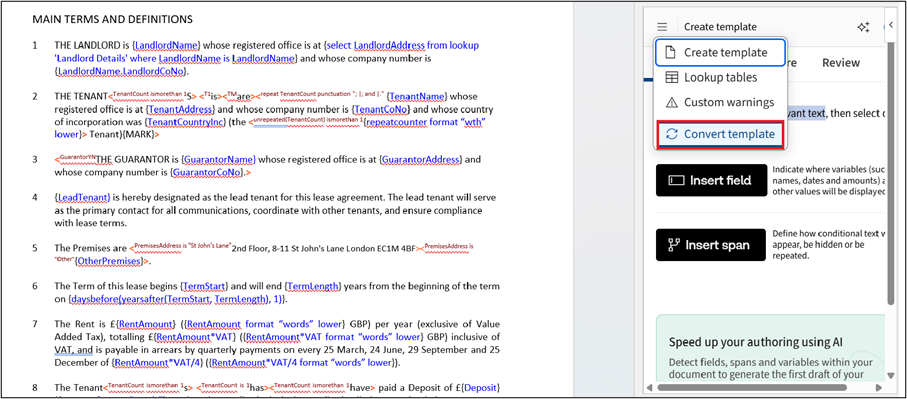
See Convert template in Author Online for more information.
Set default values on text selection variables
Text selection variables now allow setting default choices that appear as preselected options in the questionnaire.
See Add markup with Author Online for more information.
AI Features
AI Questionnaire Population – Excel Answer Extraction
You can now extract answers directly from Excel files using AI-powered Questionnaire Population. This enhancement improves flexibility when working with document-based questionnaires.
See AI Questionnaire Population for more information.
Improved Formatting for AI Chat
AI Chat formatting has been improved for better readability.
Template Authoring
Dynamic information in the inserted text strings
The new
FillFields
function locates fields in inserted strings and populates them with values from local or external lookup tables.See FillFields Function for more information.
Enhanced formatting of inserted text strings
Improved conversion of HTML into WordML, resulting in more accurate formatting for text added via Insert HTML fields.
See Include HTML Field for more information.
October 2025 (Release 10.14)
Author Online
Custom Warnings in Questionnaires
You can now create, edit, and manage custom warnings to help ensure users provide valid combinations of answers in the questionnaire. Warnings can be classified into:
- Compulsory- must be resolved before document generation can proceed.
- Non-compulsory- allow users to continue while highlighting potential issues.
See Add Custom Warnings to Questionnaire for more information.
Flexible Template Testing Options
You can now choose how to test templates more flexibly in Author Online. Continue testing with the latest test document (pre-filled with previous answers), start fresh with a new test document, or upload the template without launching the questionnaire.
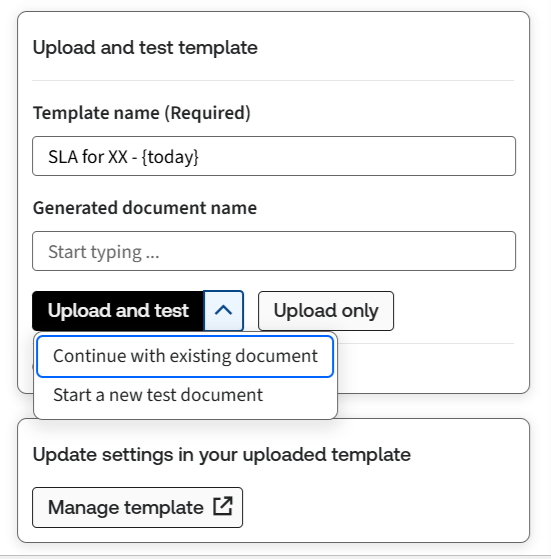
See Template properties and Upload settings for more information.
Documents
Redline Document Comparison
(Standalone Contract Express Only)A new feature allows users to generate a redline version of a document that highlights conditional text excluded from the template. These exclusions appear as tracked deletions in Word, making it easier to identify differences between the generated document and its source template.
This feature is controlled by a Profile setting (disabled by default). When enabled, a new compare to template action appears in the menu next to each generated document.
Author Desktop
UK Address Search Upgrade
The service used for searching UK addresses has been enhanced. It now supports searching by partial address details as well as full or partial postcodes, offering greater flexibility and improved user experience.
/address_search.png/_jcr_content/renditions/original)
See Post Code search for more information.
September 2025 (Release 10.13)
Questionnaire
AI Questionnaire Population – PDF Answer extraction
You can now extract answers directly from PDF files using AI-powered Questionnaire Population. This enhancement improves flexibility when working with document-based questionnaires.
See AI Questionnaire Population for more information.
Questionnaire Performance
The speed of loading the new questionnaire page has been improved for a better user experience.
Documents
Read-only PDF option for copying text
A new option was added to the Profile editor for PDF read-only output, which now allows copying of text from the generated document.
Author Online
Automatic Questionnaire setup – Expanded variable handling
The Auto Setup feature in Author Online now supports a higher number of variables. You can add pages and allocate additional variables into an existing questionnaire structure with ease.
See Questionnaire Tab for more information.
Author Online now supports Lookup tables
Add local lookup tables to use data lookup in your template.

See Using lookup tables in Author Online for more information.
Broader variable support for custom masks
Custom formats now support multi-select and multi-line text variables, expanding on the previous release.
See Markup Tab for more information.
August 2025 (Release 10.12)
AI Markup Suggestions - recommended document size
Our AI-powered Markup Suggestions can now process larger documents. The recommended maximum document size has been increased to 15,000 words.
See Markup Suggestions for more information.
Automatic Questionnaire Setup in the document’s language
The system now detects the document’s language and automatically generates appropriate page and group names.
See Questionnaire Tab for more information.
Reusable Computations
You can now define computations as variables directly within the Markup tab, making it easier to reuse expressions across your template.
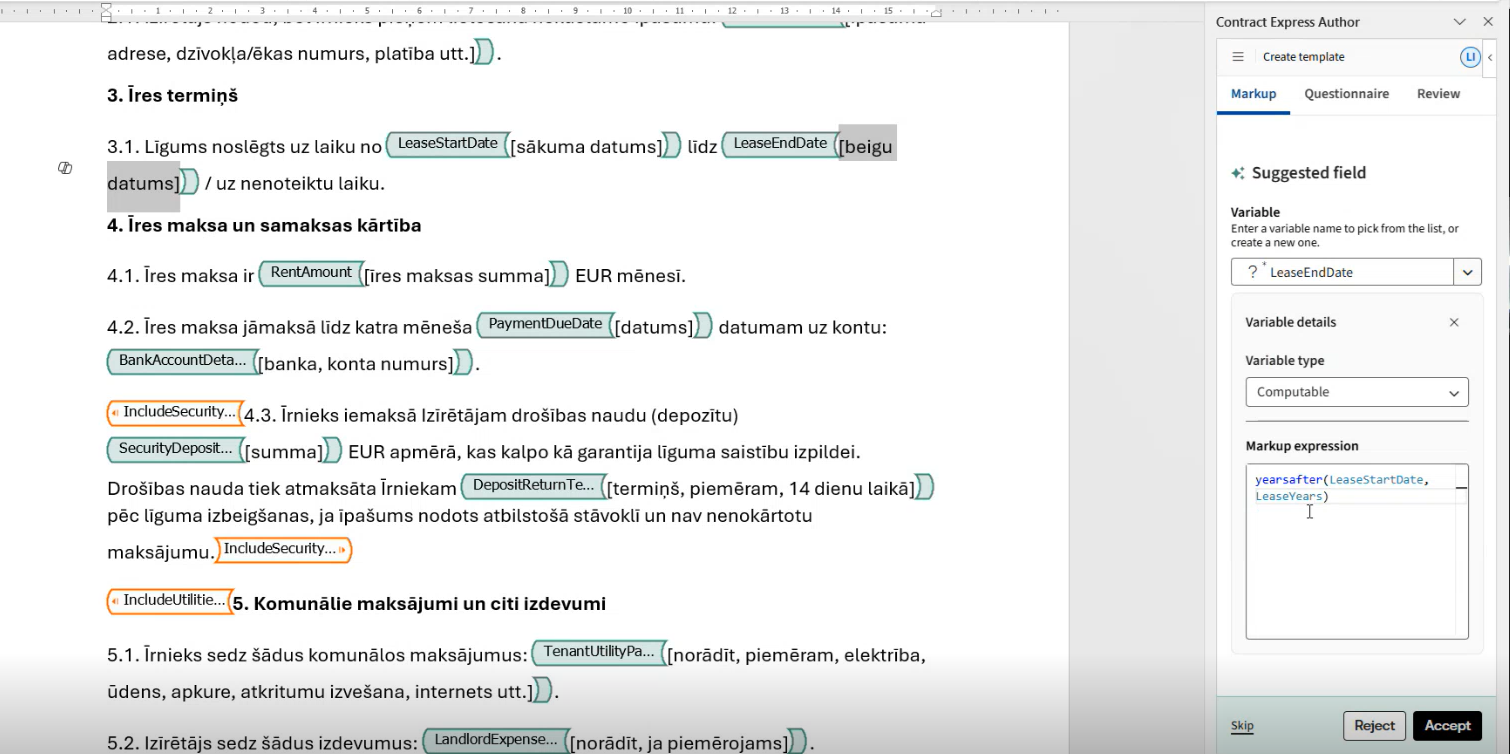
note
This is currently accessible only via the Markup tab and not the Questionnaire tab.
See Markup Tab for more information.
Custom Masks and Formats
New options allow you to apply custom masks and formats for date, time, and number variables, ensuring consistent and flexible formatting throughout your template.
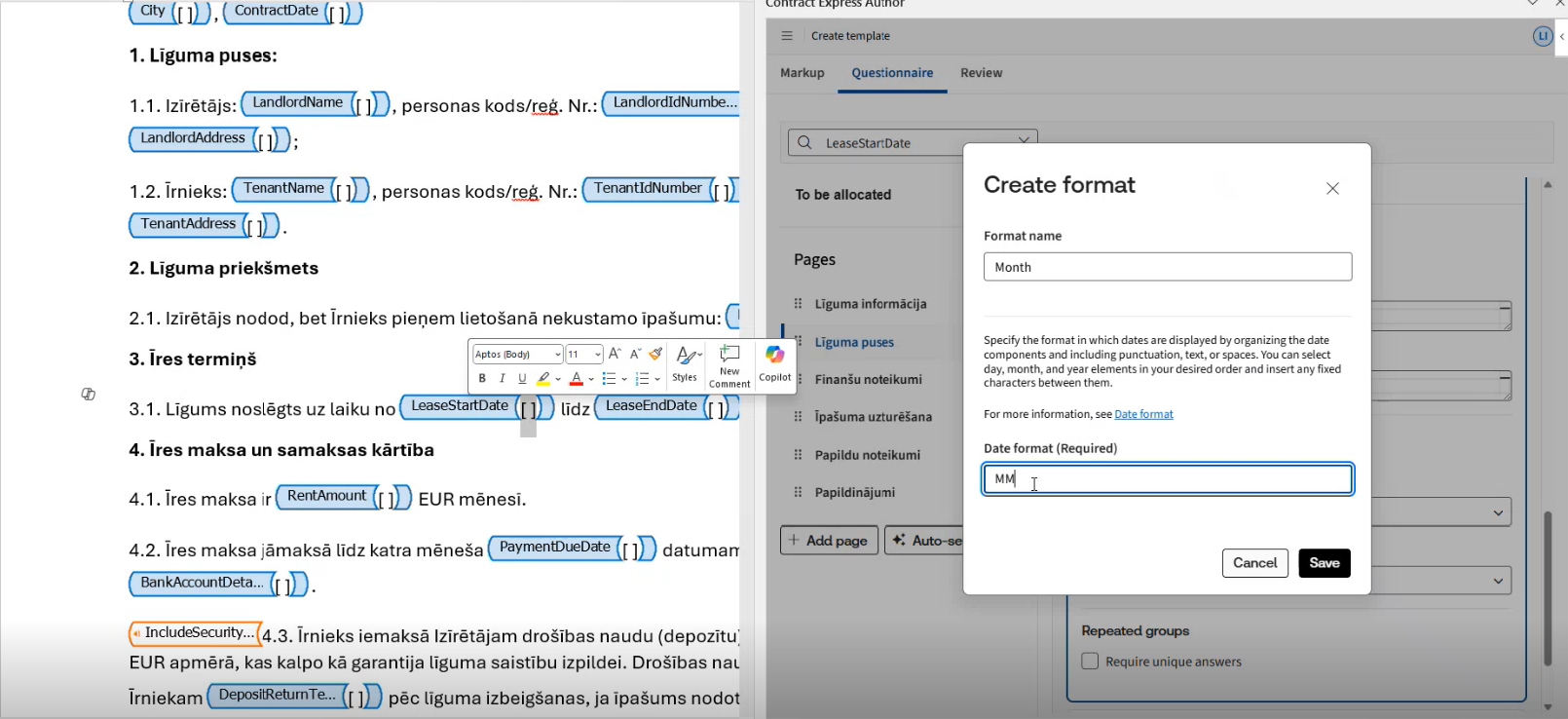
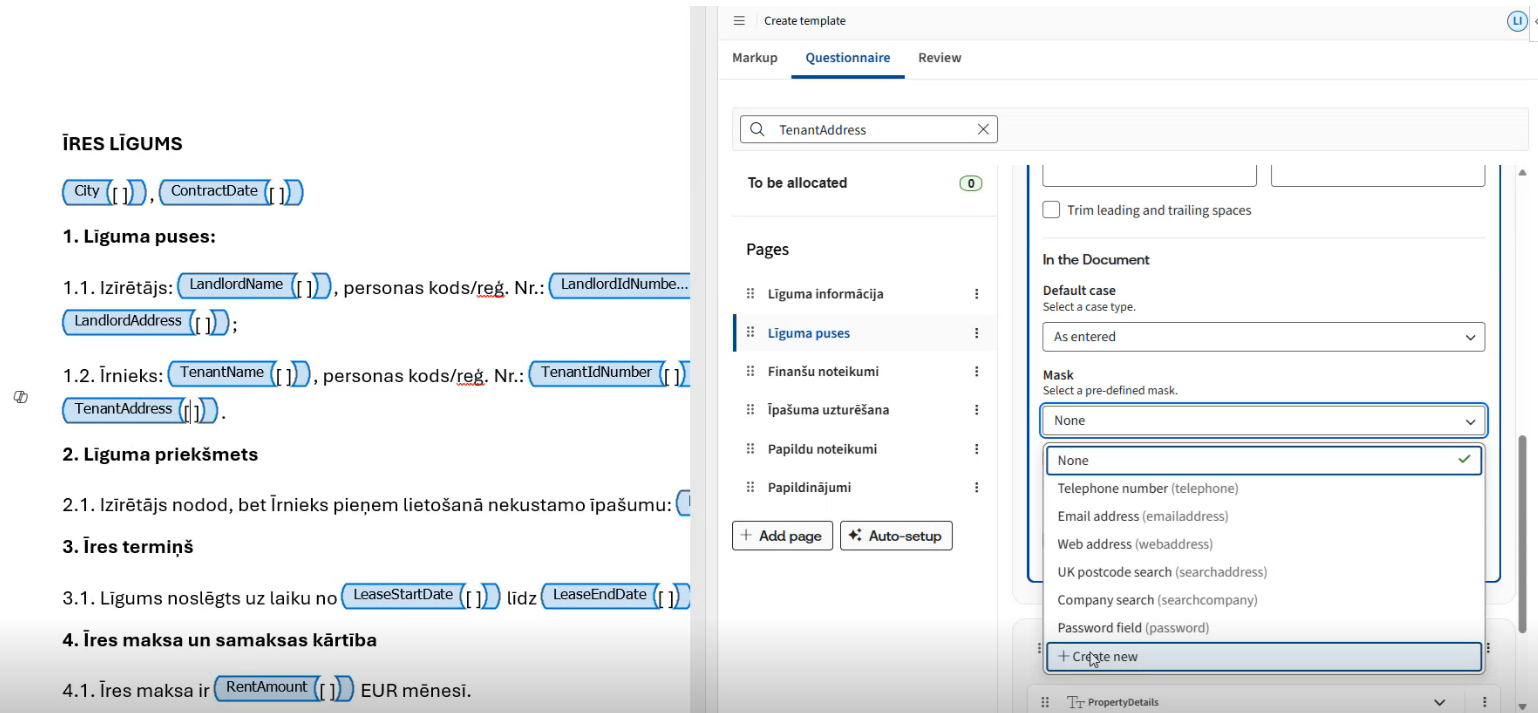
See Constraints Tab and Markup Tab for more information.
July 2025 (Release 10.11)
AI Questionnaire Population
Streamline your questionnaire process by enabling automated answer extraction from documents such as term sheets or emails. Enable Answer Extraction on designated templates to pull in information from Word, text files or emails.

See AI Questionnaire Population for more information.
AI Span Detection in Model Document
Building on the release of field detection, we’ve introduced AI-powered span detection in model documents, available in both Author Desktop and Author Online, to accelerate the template-building process by automatically identifying relevant spans.
See Markup Suggestions and Markup tab for more information.
AI Markup Suggestions on Other Languages
AI markup suggestions can now be run on non-English documents, with the language automatically detected and prompts generated in that language.
See Markup Suggestions and Markup tab for more information.
June 2025 (Release 10.10)
Author Desktop
One-click markup removal
To clear markup highlighting in the document, use the "
clear highlighting
" option from the Options tab. This will revert all the items to black colour in the template to ensure consistent formatting.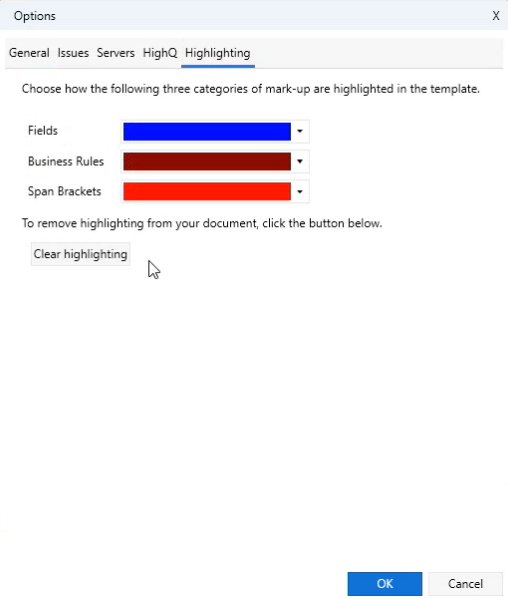
Re-use existing variables in AI Markup suggestions
Re-use existing variables from an existing template by importing them before running AI Field Detection to ensure they are matched with detected fields.
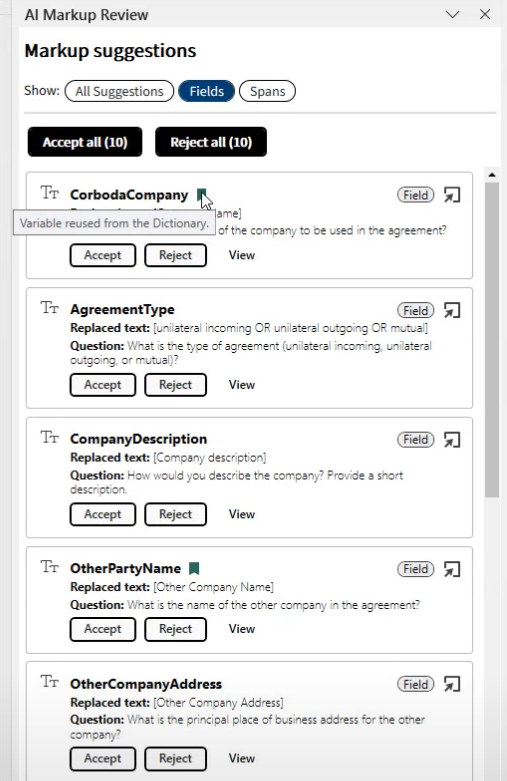
See Markup Suggestions for more information.
Review external table information in the Template Suite Viewer
Easily view and track all external tables used across your templates within the Template Suite Viewer.
See Accessing external data in the questionnaire for more information.
Simulate External Tables as Lookup Tables
You can now recreate external tables as local lookups for troubleshooting when source data is inaccessible. This option is available for both single templates and template suites.
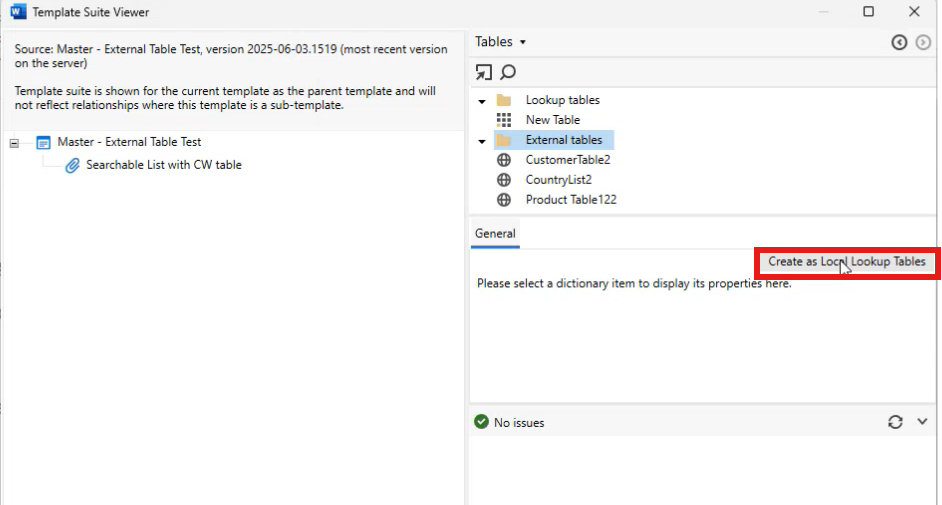
See Accessing external data in the questionnaire for more information.
Author Online
Enhanced editing features in Advanced Mode
Advanced mode now suggests predictive text based on the user's search, improving precision, formatting, and usability.
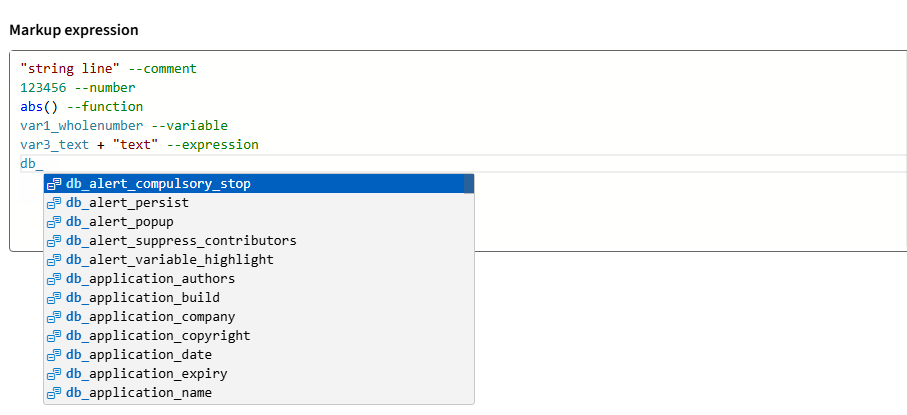
See Markup Tab for more information.
Search for a variable in the Questionnaire
Users can search for a specific variable from the Questionnaire tab by entering the keyword in the search window, allowing them to quickly locate the information they need.
Run the Auto-setup functionality on existing groups and pages
You can re-run the auto-setup functionality on existing groups and pages to easily allocate newly created variables.
See Questionnaire Tab for more information.
Advanced variable input settings
With the Advanced settings tab in the variable details, you can manage variable settings, including default values, formatting, and constraints. This new tab allows you to set default values, define minimum and maximum values, and choose default case formatting (e.g., uppercase, proper case). These options may vary depending on the specific variable.

See Markup Tab for more information.
May 2025 (Release 10.9)
Author Online
Updated Issue list functionality
The new undock functionality allows users to view issues in a pop-out window, allowing them to keep track of all issues while working on a Markup or Questionnaire tab and move them to another screen while maintaining visibility. This enhances the user's capability to monitor issues while performing other tasks.

Simplified Questionnaire Access
Users can now access the Questionnaire directly without expanding it, providing quick and easy access to essential information.

April 2025 (Release 10.8)
Author Online
One-click navigation to Issue details
A direct navigation feature, marked by a '-->' symbol, has been added to the issues window to enhance user efficiency. Clicking the arrow allows users to quickly access the location of specific issues, minimising manual searching and speeding up workflow management.

Enhanced drag-and-drop functionality for easy variable repositioning
The enhanced drag-and-drop functionality allows seamless movement of variables across the questionnaire and different groups on the same page, with clearer target location indicators. An accessible method for keyboard-only users has been added to ensure compliance with accessibility requirements. Additionally, the issue indicator highlights issues, such as invalid text or misplaced variables, within the questionnaire, thus guiding users to identify and address issues, ensuring better functionality and accuracy.

March 2025 (Release 10.6)
List format supports Oxford comma
The format for lists and multi-line text has been updated to specify the use of separators depending on the number of items. For example, use the format ", |, and |.| and " to get:
- "Anna and John." for two items in the list
- "Anna, John, and Lisa." for three items in the list
Convert content-based markup to character-based markup
Users can now convert content markup from templates created using the new author online add-in to the traditional character-based markup, utilising the convert template option.

The converter is particularly useful when you receive a template that includes content control markup. If you wish to continue working on this template but require advanced functionalities, such as lookup tables or warnings, which are not yet available in the new author add-in, this conversion process will facilitate your workflow.
Create lookup table as external table from dictionary
Lookup tables can now be configured as external tables to enhance flexibility in data management. This is particularly useful when you need to maintain separation between a lookup table and the template where it will be used. By setting up lookup tables in a separate template, users can model external table functionality, supporting a modular design and ensuring data integrity and functionality across various components.
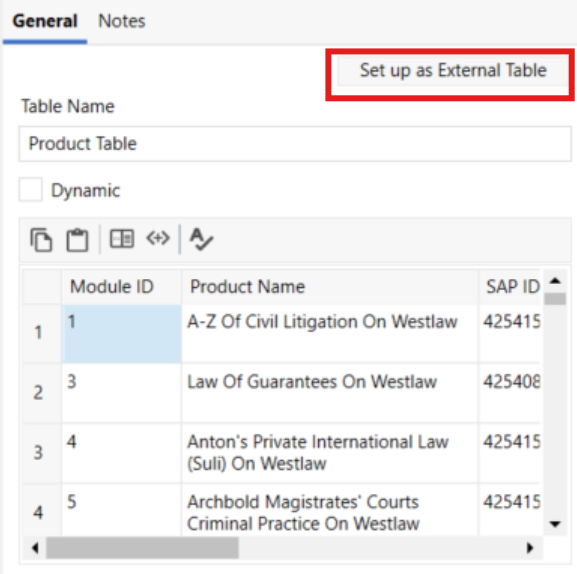
To configure a lookup table as an external table, simply navigate to the desired lookup table and click the "Setup as External Table" button. This action streamlines the setup process, and the system immediately confirms the successful creation of the external table. This feature simplifies lookup table management and improves the handling of complex data structures efficiently.
note
Starting with version 10.6, local lookups can be used as external tables via the admin tab in the CE interface.
August 2024 (Release 10.0)
AI-powered field detection tool for faster template automation (Beta release)
Introducing Detect fields - the first advanced AI feature available to our customers as a Beta release.
- Use AI to to get a first draft of the required fields in your template with just one click;
- Review each of the detected fields as well as the corresponding variables that are automatically generated.
Want to talk about your experience with this Beta feature? We are currently welcoming feedback! Please fill in this quick survey to let us know your thoughts.
Expanded content for AI Chat
Improved AI Chat experience with direct access to content from the Knowledge Base Community forum, featuring expert responses to hundreds of practical automation questions.
Breadcrumb navigation for nested repeats in the questionnaire
The modernised questionnaire in v10 now features breadcrumb navigation for nested repeats, enabling users to clearly see the hierarchy of nested groups and quickly navigate to the parent repeat level. Customize the group repeat titles to take full advantage of this enhancement. Find out more here.
Related Content
-
What's new?
Format: Article