
How do I create and manage interface groups in In Out?
The
group of interfaces
aims to associate similar interfaces in order to facilitate information maintenance. Thus, when a new interface is registered on the Interface Registration
screen, the Group Code
field allows it to be linked to one of these groups.Adding an interface group
- Access the menuInterfaces > Interfaces Group.
- ClickAdd
 .
. - According to the definitions, complete the fields on theCreate Interface Groupscreen:
 * Required fields
- Group Code*: Identification code of the interface group. Example: INTERFACES_SAP
- Description: Brief definition of the Interface Group. Example: SAP integration interfaces
- ClickSave.
Editing an interface group
- Access the menuInterfaces > Interfaces Group.
- On theInterface Group Filterscreen, click theEdit
 button for the groupwhose description you want to change.
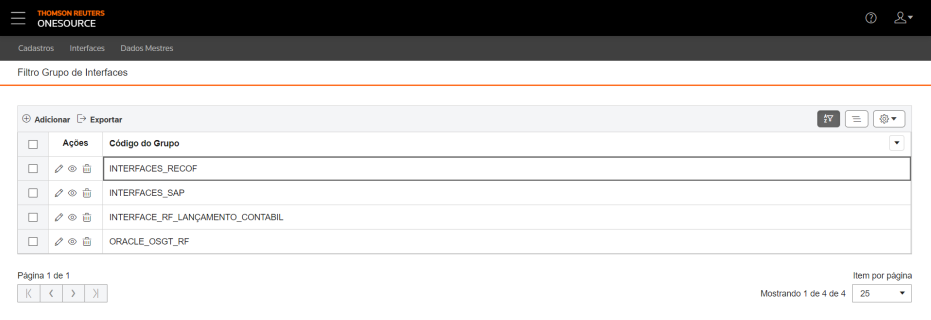 To view or delete a group record, click theView
 and Delete
 buttons, respectively.
 - On the edit screen, make the necessary changes.
- ClickSave.Table data can be organized using theHide Filters
 , Show Grouper
 , and Show/Hide Columnsbuttons
 .
.
Generating SQL scripts from an interface group
- Access the menuInterfaces > Interfaces Group.
- On theInterface Group Filterscreen, click theView button for the group to generate the script.Table data can be organized using theHide Filters, Show Grouper, and Show/Hide Columnsbuttons.
- On theInterface Group Detailsscreen, clickGenerate a SQL Script
 .
. - On theScriptsscreen, clickSave SQL Script.
A SQL file will be generated with the group script.
Exporting an interface group
- Access the menuInterfaces > Interfaces Group.
- On theInterface Group Filterscreen, select the groups whosecodesyou want to export.
 To export data from all rows in the table, this marking is not required.Table data can be organized using theHide Filters, Show Grouper, and Show/Hide Columnsbuttons.
 - ClickExport
 .
.
An Excel file will be generated with the desired group 
codes
, for example:Related Content
-
How do I register and configure interfaces in In Out?
Format: Article
-
How do I create and manage interface schedules?
Format:
Article
-
How to monitor and manage data imports/exports in In Out?
Format:
Article
-
How do I check the status of the interfaces?
Format:
Article
-
How do I resolve data import errors in In Out?
Format:
Article
-
How do I take manual appointments of interfaces in In Out?
Format:
Article
-
How to register and manage machines in In Out?
Format:
Article
-
How do I set up notifications from users and entities in In Out?
Format:
Article
-
How do I manage In Out input interface tables?
Format:
Article