
PGA Data Screen (PGA Mapping)
Below is a description of all the screens involved with creating or editing PGA data on a product record and the potential data elements that can be added. This screen is opened by clicking
Edit
for a record on the PGA Mapping
screen. This can be done from any tab.
In order for data to be saved to a product record, you must click
Save
in each separate section and/or tab. The Save
link will be available in the top left corner of each section. 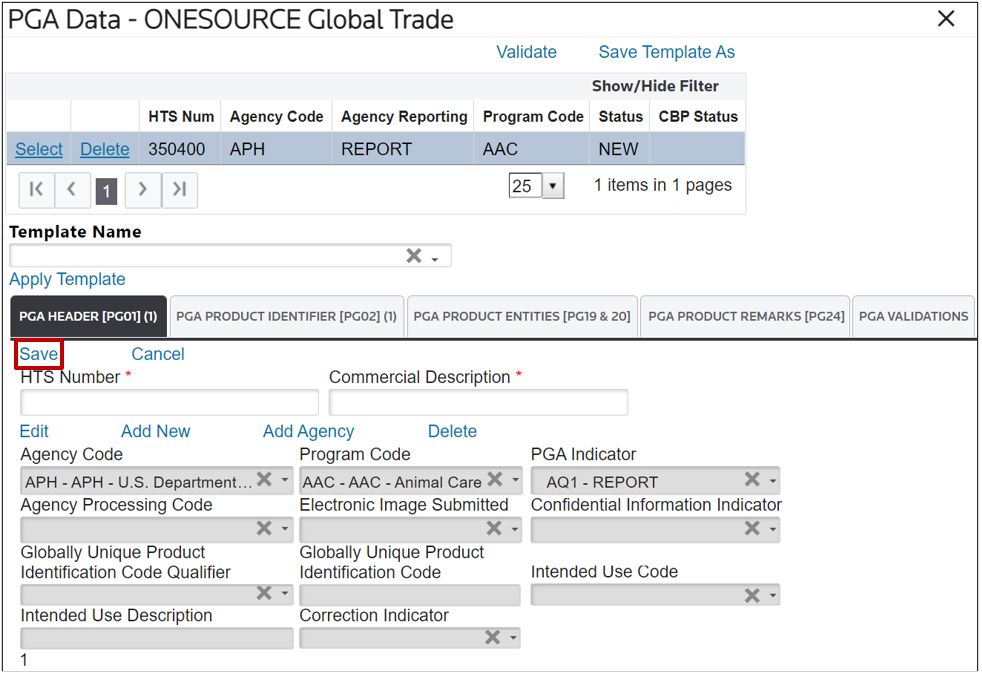
Related Content
-
PGA Header [PG01] Overview
Format: Article
-
PGA Header [PG01]
Format:
Article
-
Multiple PGA Headers [PG01]
Format:
Article
-
PGA Product Identifier [PG02]
Format:
Article
-
Constituent Element [PG04]
Format:
Article
-
Product Scientific [PG05]
Format:
Article
-
Product Source [PG06]
Format:
Article
-
Trade/Brand Detail [PG07]
Format:
Article
-
Trade/Brand Additional [PG10]
Format:
Article
-
Licenses, Permits, Certificates, or Other [PG13/PG14]
Format:
Article
-
Common Names [PG17]
Format:
Article
-
Hazardous Materials [PG18]
Format:
Article
-
Importer Documents [PG22]
Format:
Article
-
Affirmation [PG23]
Format:
Article
-
Temperature [PG25]
Format:
Article
-
Packaging [PG26]
Format:
Article
-
Containers [PG27]
Format:
Article
-
Can [PG28]
Format:
Article
-
Commodity [PG29]
Format:
Article
-
Inspection [PG30]
Format:
Article
-
Commodity Harvesting [PG31]
Format:
Article
-
Commodity Routing [PG32]
Format:
Article
-
Commodity Routing Geographic [PG33]
Format:
Article
-
DOT [PG35]
Format:
Article
-
PGA Product Entities [PG19 & PG20]
Format:
Article
-
PGA Product Remarks [PG24]
Format:
Article
-
PGA Grouping
Format:
Article
-
PGA Validations
Format:
Article
-
PGA Information
Format:
Article